KDDI Corporation
Okinawa Cellular Telephone Co., Ltd.
KDDI Digital Life Co., Ltd.
KDDI, Okinawa Cellular, and KDDI Digital Life will launch a campaign starting August 31, 2026, offering a "Unlimited data (24 hours)" (Note 1) to customers who experience customer service at Metro Opus Umeda Store and Metro Opus Tanimachi 9-chome east.
validity Humanoids developed by KDDI and AVITA are installed inside Osaka Metro stations, and humanoids dressed in Osaka Metro uniforms serve as 'humanoid station staff,' providing customer service and guidance.
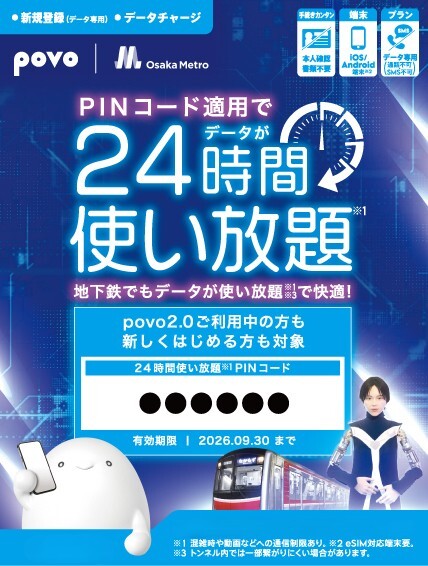
In this campaign, the first 2,800 people who experience various guidance and dialogues with humanoids will receive a PIN code for "Unlimited data (24 hours)." The PIN code you receive can be used at any time within the validity period. In addition to customers already using povo2.0, new registrants can also use the service.
povo2.0 provides a comfortable communication environment without worrying about internet data inside stations or on the subway.

You can scroll to the right
| Benefits | データ使い放題(24時間) |
|---|---|
| Distribution locations and validity for the special offer. | ① Metro Opus Umeda Store: August 31st - September 6th, 2026 (Immediately outside the North Ticket Gate of Umeda Station on the Osaka Metro Midosuji Line) ② Metro Opus Tanimachi 9-chome east: September 9th to September 15th, 2026 (East side of the east ticket gate at Tanimachi 9-chome Station on the Osaka Metro Tanimachi Line and Sennichimae Line) |
| Target Audience | The first 2,800 customers who experienced humanoid guidance and interaction at Metro Opus Umeda and Metro Opus Tanimachi 9-chome East *This offer is available to both new povo2.0 registrants and existing povo2.0 users. |
| How to use | <For new registrants> STEP 1: Access the dedicated page via the QR code on the back of the ticket. *Please access this page using the Safari or Chrome browser. STEP 2: Select "Those who are not subscribed to povo2.0" at the bottom of the page. STEP 3: Follow the on-screen instructions to enter the PIN code on the front of the card and proceed with the new registration process. STEP 4: After completing new registration, use the benefits. <For customers who are already using our service> STEP 1: Open the povo2.0 app and tap "Giga Charge Card" at the bottom of the screen. * If you do not have the povo2.0 app, you can also use the dedicated page accessible via the QR code on the back of the ticket. Select "Login" and follow the on-screen instructions to enter the PIN code on the front of the ticket. * Please be sure to access from the Safari or Chrome browser. STEP 2: Follow the on-screen instructions to enter the PIN code on the front of the ticket. STEP 3: After the PIN code has been applied, you can use the benefits. *The PIN code validity until September 30th. |

We are currently running a campaign offering 10 sessions of Unlimited data (24 hours each) to new povo2.0 registrants. You can receive this benefit by entering the campaign code for 10 sessions of Unlimited data (24 hours each) when you register. Furthermore, after registering, you can use this offer in conjunction with the campaign by tapping "Giga Charge Card" at the bottom of the povo2.0 app screen and following the on-screen instructions to enter the PIN code on the card.
Click here for details
(Note 1) Communication speed may be restricted during periods of network congestion or when using services such as video streaming or cloud gaming.
*Company names and product names are generally trademarks or registered trademarks of their respective companies.
*All prices shown are inclusive of tax included unless otherwise specified.
*The information listed in the topics section is current as of the date of publication.
*QR Code is a registered trademark of DENSO WAVE INCORPORATED.