
There has been concern that switching carriers will mean losing the "carrier email" (which can also be used as a general term for services and apps, but here we will use it to refer to email addresses issued by carriers such as "XX @au.com") issued by the carrier. However, services such as "au Mail Portability" (*1) have begun to be offered that allow you to transfer your carrier email to another carrier, which can solve this problem.
Mobile network operators (MNOs) that install and maintain their own communications equipment (infrastructure) are called "carriers." In Japan, this term is used to refer to the four companies: KDDI, NTT docomo, SoftBank, and Rakuten Mobile. Incidentally, all four companies offer carrier email services.
This time, we have compiled basic information about carrier email portability services. Why not use this information as a reference when switching carriers?

Carrier email "portability service" refers to a service that allows you to continue using the carrier email provided by your carrier when you signed up for a smartphone or mobile phone contract even after switching to another carrier. In addition, since you can transfer not only your carrier email but also your mailbox, you can basically think of it as being able to look back at past emails, although there are limits on storage capacity and number of messages. Similar services are offered for a fee by au, docomo, SoftBank, Rakuten Mobile, Y!mobile, and others.
Those who have a fixed-line (fiber optic) contract may have been provided with an email address issued under their provider's domain, but this is called provider email and is distinguished from carrier email. Also, some Mobile Virtual Network Operators (MVNOs) that offer low-cost smartphones and SIM cards use provider email to provide email addresses in the same way as carrier email.

Let's take a closer look at the features of carrying services. Below we have summarized the benefits and points to note about carrying services.
If you use a mobile service, you can continue to use your carrier email even if you switch to another carrier. This means you can avoid the hassle of contacting friends and acquaintances and changing your registration information for various services that occurs when you change your email address.
Another benefit of carrier email itself is its sense of security and reliability. Carrier email addresses are less likely to be filtered as spam, and emails are more likely to be delivered. Being able to continue using a reliable email address is one of the benefits of carrier email services.
One thing to note is that there are procedures and costs involved (*3). The general rule is to apply for the mobile phone service to the telecommunications company that issued your carrier email within 31 days (*1) of canceling your contract. Be aware that in some cases you may not be able to use the mobile phone service unless you apply when changing your plan.
Furthermore, you will need to pay a monthly option fees to the carrier that issued your carrier email. It has also been warned that some features, such as automatic forwarding, may not be portable (*3), and that carrier email apps may no longer be available. It is best to check the carrier's website and take precautions in advance.

In addition to carrier email, the four mobile carriers also offer mobile phone services. Because the names of the services and application procedures differ between the four companies, we have summarized the details below. We recommend checking the websites of each mobile carrier for more details.
Name: docomo Mail Carry
Monthly fee: tax included 330 yen
How to apply: You can apply from a dedicated website or online such as "My docomo"
Terms of use:
・If you are canceling your line, you must do so within 31 days of cancellation (if you are changing your plan to ahamo, you must be currently under contract with docomo).
- You have a d ACCOUNT ID issued based on your line contract.
・The line contract name is not a corporate contract
Monthly fee: 330 yen (tax included included) per email address
How to apply: Apply through the dedicated website (you will need to log in with au ID issued based on au line contract)
Terms of use:
・Apply for this service within 31 days (*4) after canceling your au contract
・Have au ID (*5) issued based on au line contract
Name: Email address portability
Usage fees: Annual fee 3,300 yen tax included / Monthly fee 330 yen tax included)
How to apply: Available through "My SoftBank"
Terms of use:
・Apply within 31 days after canceling your line
Name: Easy Mail Carry-On
Monthly fees: 330 yen tax included)
How to apply: Available through "My Rakuten Mobile"
Terms of use:
・Apply within 31 days after canceling your line

As mentioned above, continuing to use carrier email with a mobile service requires payment. If this is costly, some people may be considering other options. In that case, it may be a good idea to use a "free email" service instead.
Free email is a general term for email services that can be used for free once you create an account. Some people may already be using services such as Gmail from Google or Yahoo! Mail from Yahoo!. As we will explain later, there is also a way to transfer past communications made with carrier email to free email. It is best to try this before switching, as there is a chance that carrier email apps will no longer be usable after switching.
In addition, free email services have a system in place that keeps email archives on the web. Therefore, even if you switch carriers, you can simply log in to your free email account and view your past emails without having to go through the migration process, which is said to be one of the benefits of free email services.
However, if you have not transferred your email address using a mobile phone service, your carrier email will be discontinued when you cancel your carrier contract after switching, and you will need to use a free email address to communicate emails from now on. Don't forget to notify acquaintances and friends of your contact changes and update your registration information for various services. Also, be aware that compared to carrier email, there is a concern that emails you send with a free email address are more likely to be classified as spam by the recipient.

Here's an overview of how to transfer past emails exchanged with carrier email to a free email service. This time, we've summarized the steps for transferring to Gmail using an iPhone. For other cases, please check the website of the company that issued your email address for instructions on how to transfer.
Download the Gmail app from App Store.
*If you already have a Google account, please proceed to (3).
Open the Gmail app and create a Google account. Tap "Create an account," choose an account name and password, and proceed through the screens. Enter your personal information and a reset email address, and agree to the terms and conditions to create your account.
From the "Settings" app, open "Mail" and go to "Accounts." Select "Gmail" under "Add Account." You will be asked for permission, so tap "Continue."
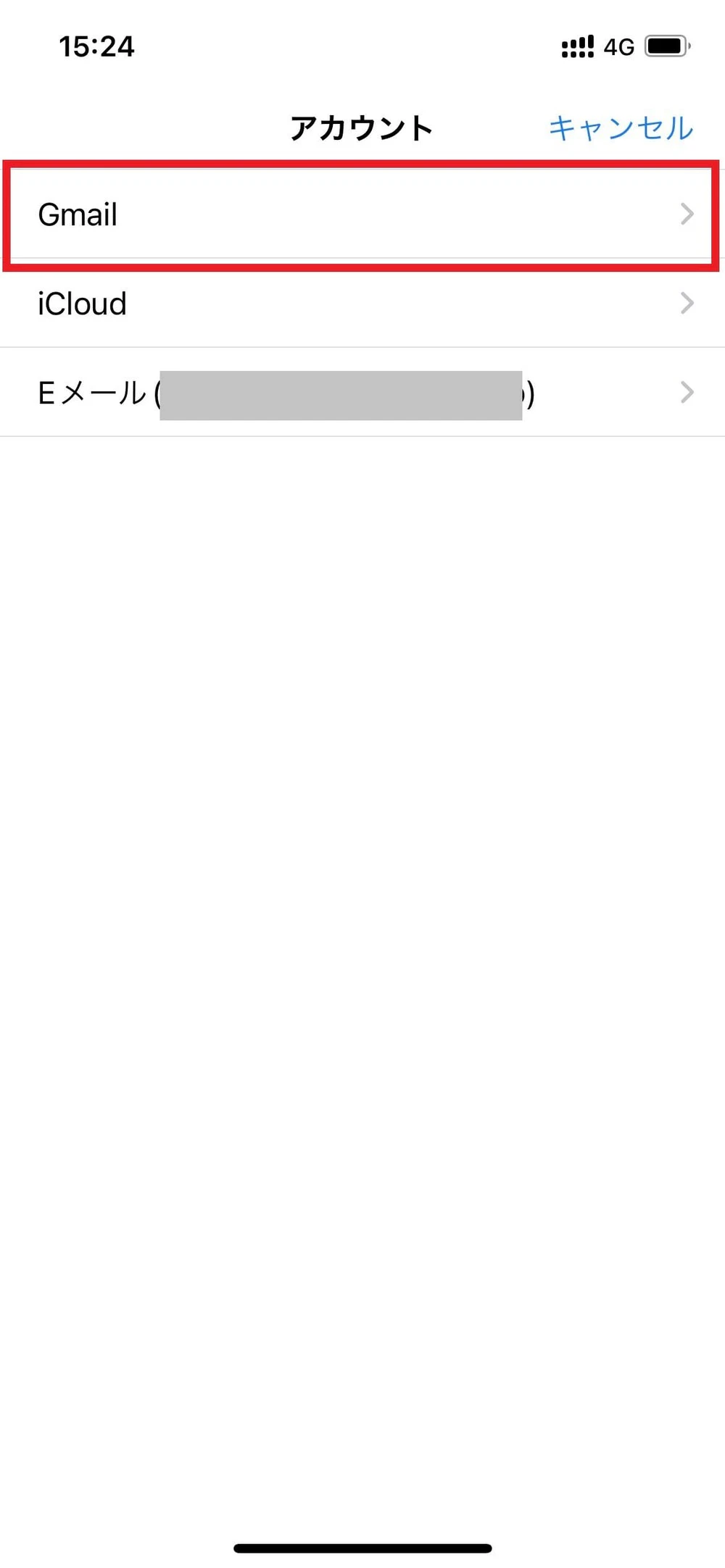
Enter the email address and password for Google account you created.
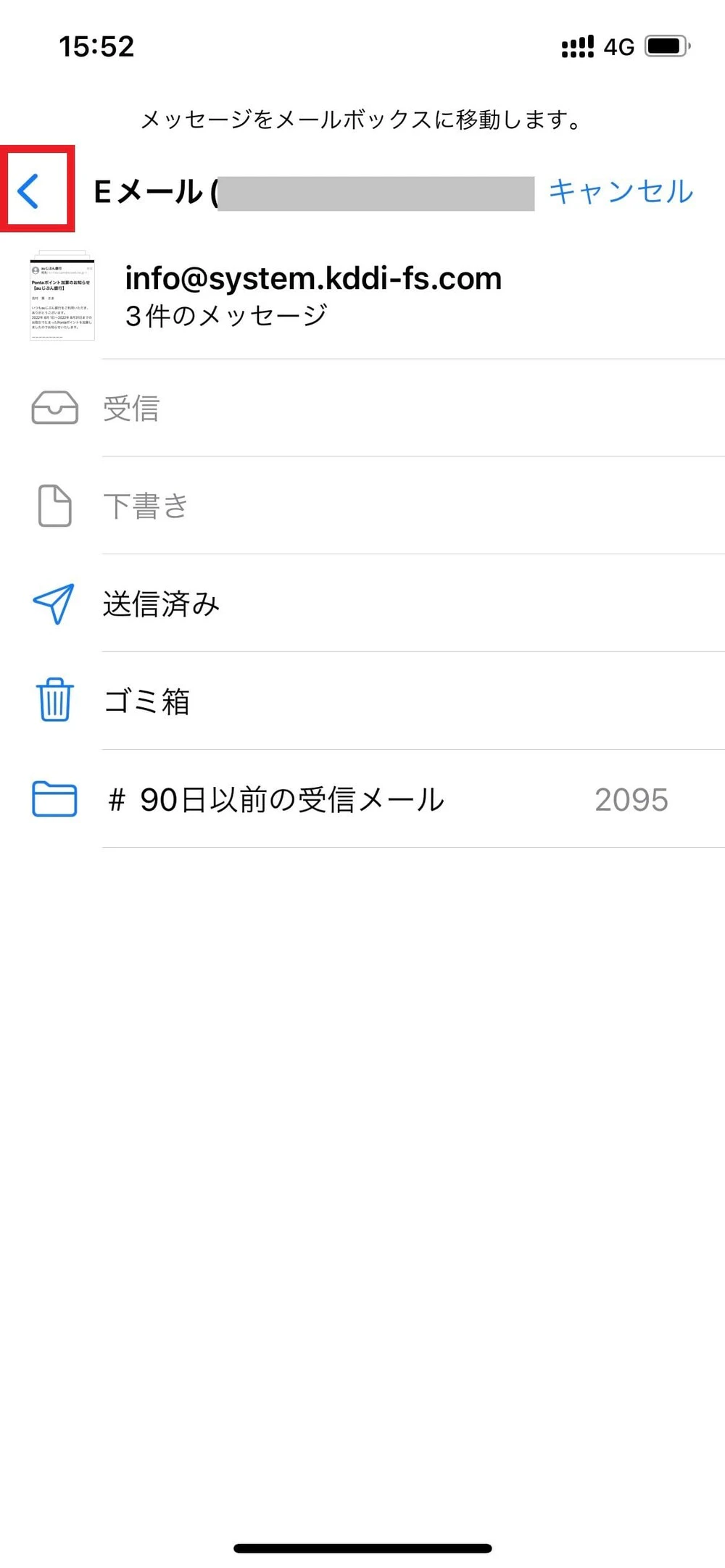
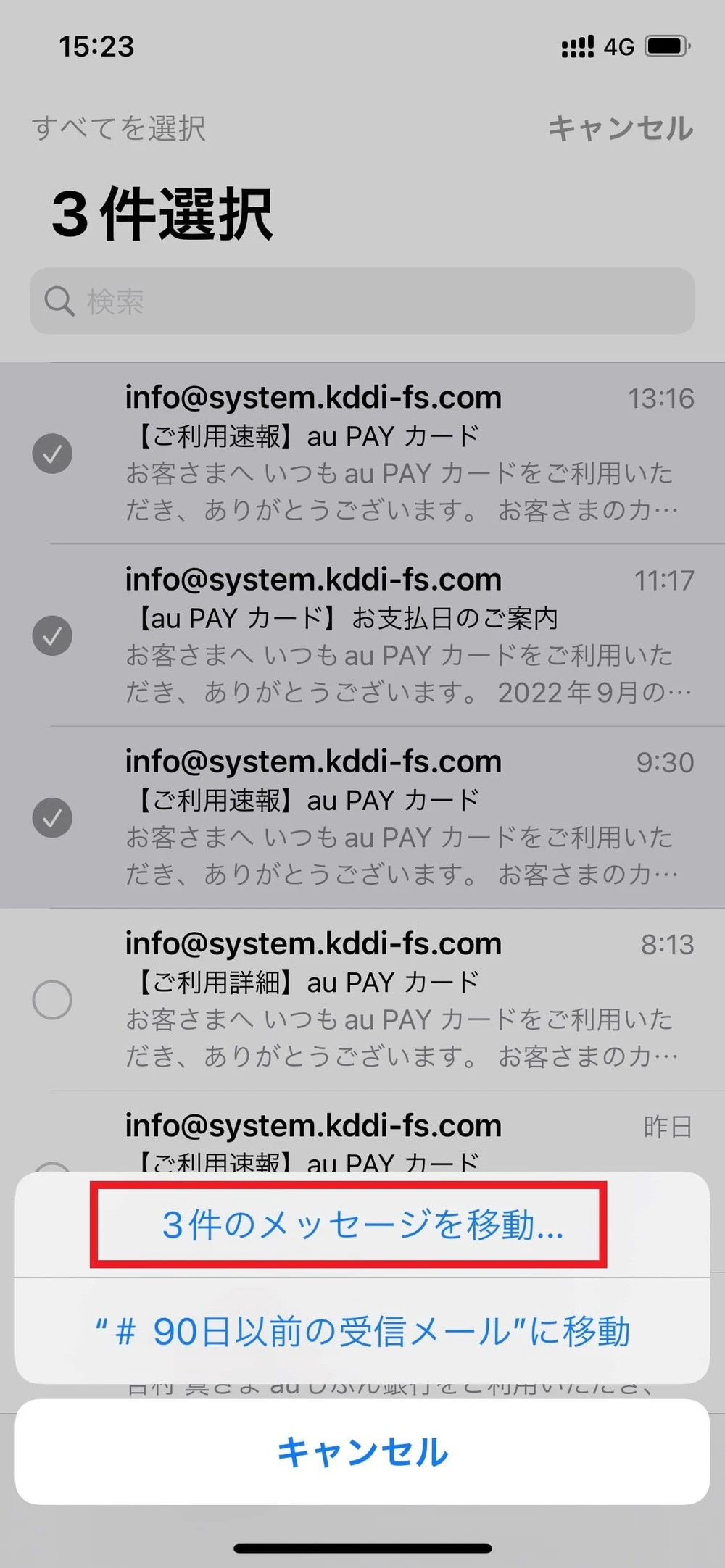
Open your carrier email inbox from the email app and tap "Edit" in the top right corner of the screen.
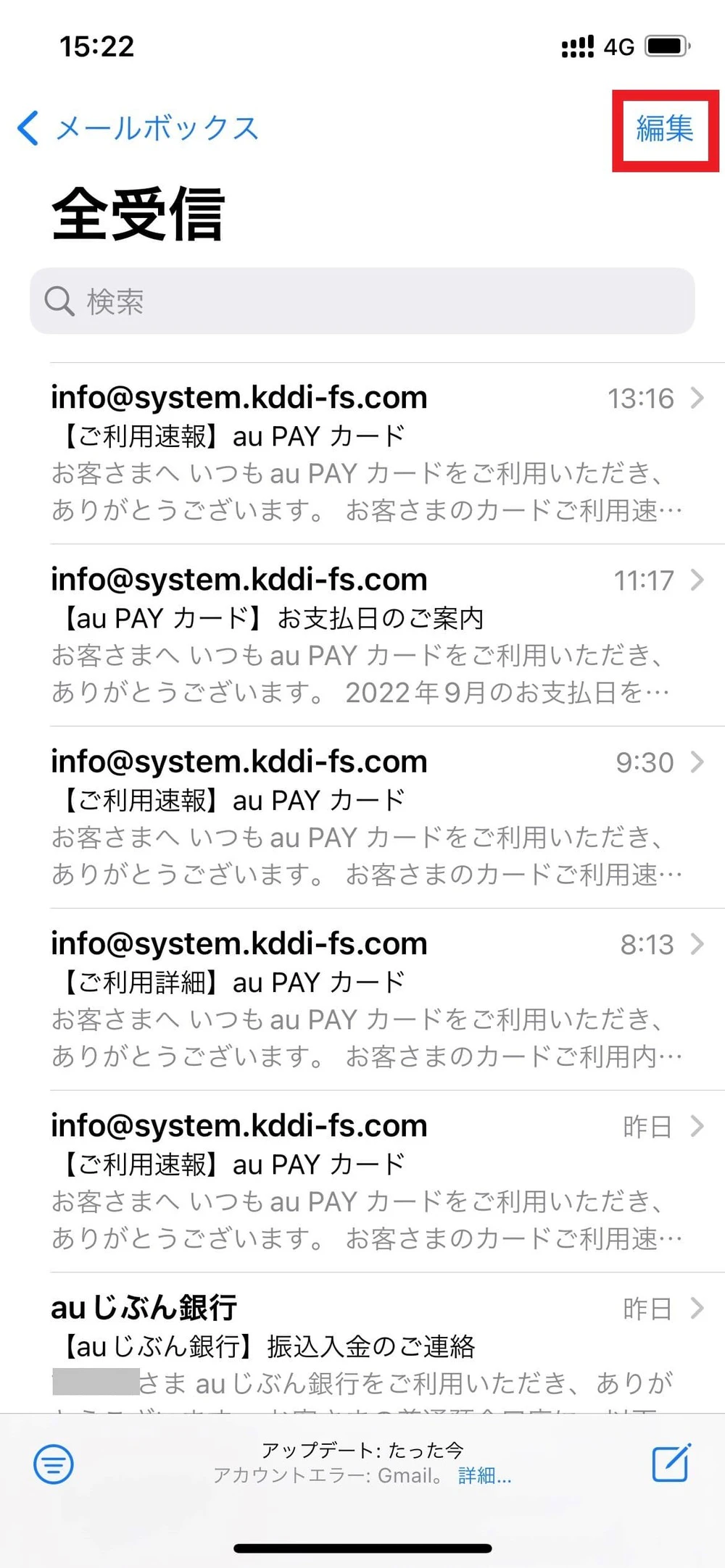
You will then be able to select the emails you want to transfer, so check the boxes next to the emails you want to transfer.
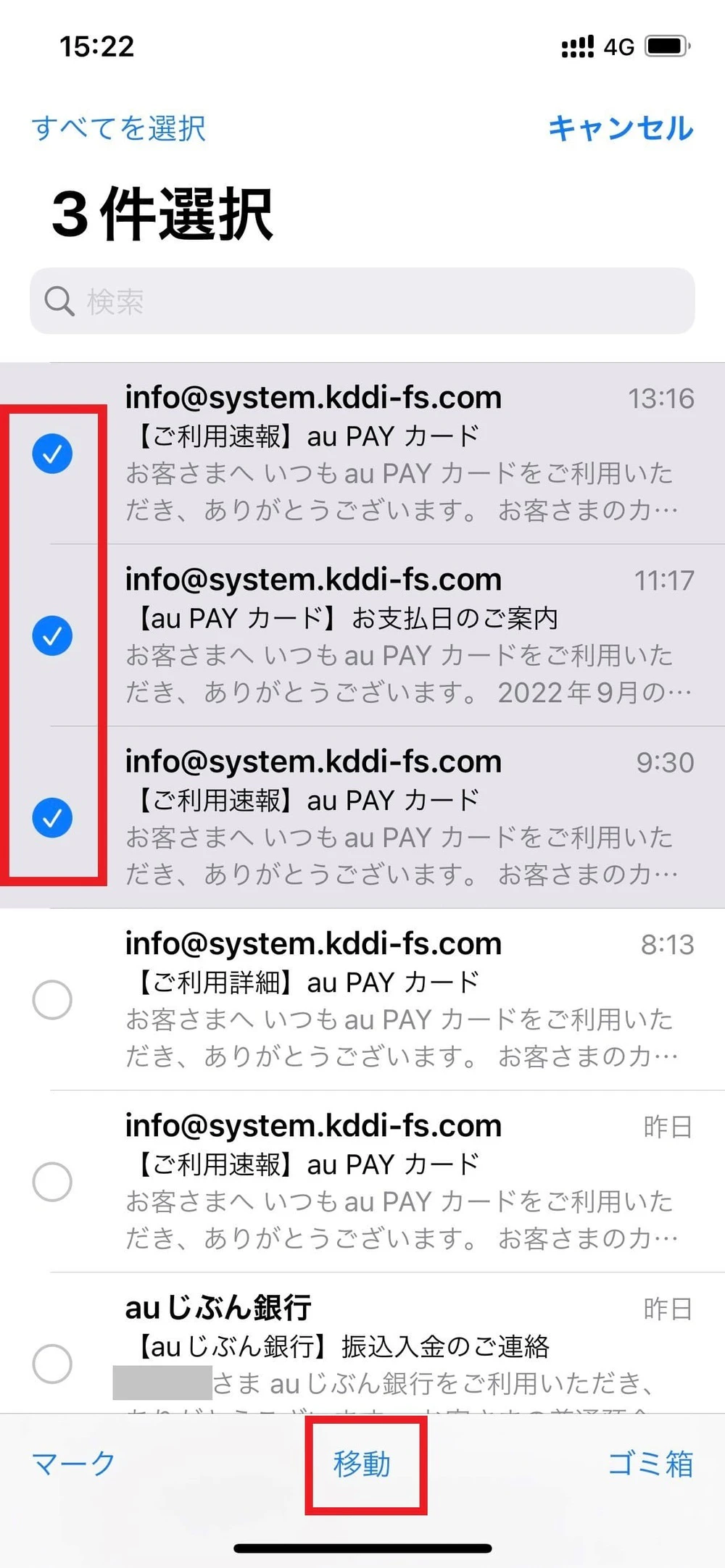
Once you've made your selections, press "Move" at the bottom of the screen and tap the Gmail folder to move the email.

Carrier email portability services are also available when switching to an online-only brand like povo2.0. povo2.0, in particular, offers a system where you can purchase as much data as you need for a basic fees of 0 yen (*6) (*7) (*8), and then Topping (for a fee). This allows for more flexibility than other online-only brands or budget smartphones/SIMs.
Since carrier email portability services cost money, why not try using a smartphone at a discount with povo2.0?
povo2.0 uses au 's 5G (*9) network as well as au 4G LTE network, which boasts a population coverage rate of 99.9% (*10), allowing communication from various locations throughout Japan. If you are considering switching carriers using carrier email portability services, we recommend using povo2.0.