
When connecting a PC to the internet while on a business trip, many people use "tethering," which uses a smartphone as a wireless router. With povo2.0, you can use the tethering function without any additional fees or prior registration.
This time, we will introduce in detail the benefits and usage of the tethering function provided by povo2.0, as well as tips for using it when on business trips.

It's not uncommon to find yourself in situations where you need to connect your computer to the Internet while on a business trip, such as when you need to reply to an urgent email or have a sudden web conference scheduled. First, we'll introduce three ways to connect your computer to the Internet in these situations.
The first way is to use free Wi-Fi. Free Wi-Fi services are now offered everywhere, including stations, airports, cafes, hotels, and public transportation. Since it's free and easy to use, many people have probably used it when they have a little free time while out or staying overnight.
While the convenience of free Wi-Fi is a major benefit, security must be taken into consideration. For example, if you use unencrypted free Wi-Fi, there is a risk that your communications may be intercepted by a third party.
You should also be careful of malicious access points known as "spoofed access points." These are access points that disguise themselves as legitimate free Wi-Fi networks, and they steal personal information from people who accidentally connect to them or trick them into downloading malware.
Free Wi-Fi may be convenient to use, but because of these risks, it should not be used when working with confidential information.
The second method is to use a pocket Wi-Fi. A pocket Wi-Fi is a portable wireless router. The advantage is that you can comfortably use the Internet outdoors as long as you are in a place with a signal.
In addition, pocket Wi-Fi communications are encrypted and an SSID and password are required when connecting, ensuring greater security than free Wi-Fi.
However, some people may find it inconvenient to have a pocket Wi-Fi device because you have to carry a router in addition to your smartphone or computer. In addition to the router itself, you also need to carry a battery and charging cord.
Also, many pocket Wi-Fi devices require long-term contracts, such as two or three years, so they may not be suitable for those who only want to use them on short business trips a few times a year.
The third method is to tether with your smartphone. Tethering is a method of connecting your computer to the Internet using your smartphone's data connection. Of course, you can connect not only computers, but also tablets and game consoles.
With tethering, you can use your smartphone as a router, so there's no need to carry a separate router like with pocket Wi-Fi. Also, since you need a password you set yourself to connect via tethering, there are fewer security concerns.
For people who are concerned about the security of free Wi-Fi or find it inconvenient to carry around pocket Wi-Fi, tethering is the ideal connection method.

Now let's take a closer look at the benefits of the tethering function provided by povo2.0.
The first benefit is that you can use it without prior registration or additional fees.
Nowadays, almost all carriers and MVNOs offer tethering functionality. However, some operators offer tethering as an optional service. In such cases, you will need to pay an additional fees or register in advance to use tethering.
For example, with au, you must apply in advance to use tethering. Also, there is a limit to the amount of data that can be tethered depending on the plan. (*1)
However, with povo2.0, you can use tethering whenever you want without prior registration or additional fees. What's more, there are no limits on the amount of data you can use with tethering. A major benefit of povo2.0 tethering is that it allows you to smoothly connect your computer to the internet even when you're on a business trip and suddenly need to do so.
*1: Reference: "Tethering Options" (au)
The second benefit is that you can separate your work and personal communications on one smartphone.
povo2.0 supports "dual SIM," which allows you to use two lines on one smartphone. By using "eSIM" (*2), which allows you to switch between lines online instead of using a physical SIM card, you can easily use different lines without having to carry two smartphones or swap SIM cards.
By taking advantage of this, you can sign up for one line for personal use and another for work. For example, if you decide to use your work line when you need to use tethering while on a business trip, it will be easier to claim the data usage as an expense.
*2: Requires an eSIM compatible device.
Reference: "Compatible models and devices" (povo)
As you can see, the appeal of povo2.0 tethering is that you can use it as much as you want, whenever you want, but there are a few things to keep in mind when using it.
The first thing to note is that your smartphone's data capacity and battery will be consumed more quickly.
This is not limited to tethering with povo2.0, but tethering will drain your smartphone's data capacity and battery faster. When using a large amount of data, such as when holding a web conference on a PC, you need to be careful not to use up your data capacity or run out of battery.
There are three main types of tethering methods: Wi-Fi tethering, Bluetooth® tethering, and USB tethering. Each has its own advantages and disadvantages in terms of battery consumption and speed, as follows:
| Tethering method | Merit | Disadvantages |
|---|---|---|
| Wi-Fi tethering | High-speed data communication is possible | Battery drains quickly |
| Bluetooth® tethering | Long battery life | Slow communication speed |
| USB tethering | High-speed data communication is possible Depending on the model, you can switch from a laptop to a smartphone. Data communication possible while power is supplied (*3) |
You need to carry a USB cable |
Taking the above characteristics into consideration, choose the tethering method that best suits your needs.
*3: Reference: "Tethering Options" (au)
The second thing to note is that speed limits may be applied.
As mentioned above, there is no limit on the amount of data that can be used with povo2.0 tethering. However, if you use up all the data remaining on your smartphone, your speed will be limited.
For example, if you have 5GB of data remaining on your smartphone, if you use up all of that data through tethering, your data speed will be limited to 128kbps. This makes it difficult to use tethering comfortably. In particular, many systems on computers run in the background, so you may not even realize that your data capacity is being used up.
If you are unsure, try to avoid speed restrictions by purchasing the "Unlimited data (24 hours) Topping (*5)" which allows you to use unlimited data for 24 hours.
*5:ネットワークの混雑時や動画・クラウドゲームなどの利用時に通信速度を制限する場合があります。

As mentioned above, one thing to be careful about when using tethering is that it can easily consume data. If you don't have enough data, you may be worried about speed restrictions hitting in the middle of work.
To enjoy tethering comfortably without such worries, we recommend purchasing "Data Topping," which allows you to communicate without worrying about data capacity.
Data Topping refers to the amount of data that can be used for high-speed communication. povo2.0 has a monthly basic fees of 0 yen (*6), and "Topping" allows you to use high-speed data communication, unlimited calls, and unlimited use of eligible services.
Among them, there are several types of data Topping available, each with different capacities and validity, as shown below.
| Data Capacity | validity (*7) | Price (tax included) |
|---|---|---|
| Unlimited data (*5) | 24 hours | 330円 |
| データ追加1GB | 7日間 | 390円 |
| データ追加3GB | 30日間 | 990円 |
| データ追加20GB | 30日間 | 2,700円 |
| データ追加60GB | 90日間 | 6,490円 |
| データ追加150GB | 180日間 | 12,980円 |
Choose the best Topping based on validity and purpose of your business trip, and how often you'll be tethering.
*6: If you do not purchase any paid Topping for 180 days or more, your service may be suspended or your contract may be terminated.
In addition, if you sign up for five lines * under the same name, a contract administration fee of 3,850 yen (tax included included) per line will be charged for each line from the sixth line onwards.
This includes lines that have been cancelled or have been canceled by our company within the past year. If you do not purchase a data Topping, the maximum sending and receiving speed will be 128kbps.
Domestic calls are charged at tax included 22 yen/30 seconds and sending SMS is charged at tax included 3.3 yen/text (up to 70 characters). Calling rates may differ for some calls, such as calls to satellite phones. For details Click here For more information, please click here.
Receiving SMS is free. Depending on the model, you can send up to 670 full-width characters.
However, up to 134 characters, the sending fee will be charged as two messages, and for every 67 characters thereafter, the sending fee will be charged as one message.
*7: Every 24 hours that passes from the time of purchase completion is counted as one day.
For the time being, all plans except for the Unlimited data Topping will be available until 23:59:59 on validity expiration date.
Reference:" Topping List" (povo)
povo2.0 's data Topping allows you to purchase only the amount of data you need when you need it, making it a great option if you use tethering while on a business trip.
For example, if you suddenly need to hold a web conference while on a business trip, purchasing "Unlimited Data (24 hours) (*5)" will allow you to concentrate on the meeting without worrying about running out of data midway through. Also, if you are on a short business trip of a few days to a few weeks, purchasing "Data Top-up 1GB (7 days)" or "Data Top-up 3GB (30 days)" will allow you to easily continue working by tethering even during waiting times while traveling.
In this way, you can purchase data capacity efficiently according to validity your business trip and your purpose, so data Topping is recommended for tethering while on a business trip.
If you purchase multiple data Topping at the same time, the data with the earliest validity will be used first. Also, validity of each data will not be extended or added together. For example, if you purchase "Data Top-up 1GB (7 days)" and "Data Top-up 3GB (30 days)" at the same time, it does not mean that you can use 4GB for a 37-day validity. Instead, once you use up "Data Top-up 1GB (7 days)," you will start using up "Data Top-up 3GB (30 days)."
Finally, we will explain in detail how to use tethering with povo2.0. Let's look at how to do it for both iPhone and Android.
First, here are the steps for tethering on your iPhone. Open your iPhone and follow the steps below.
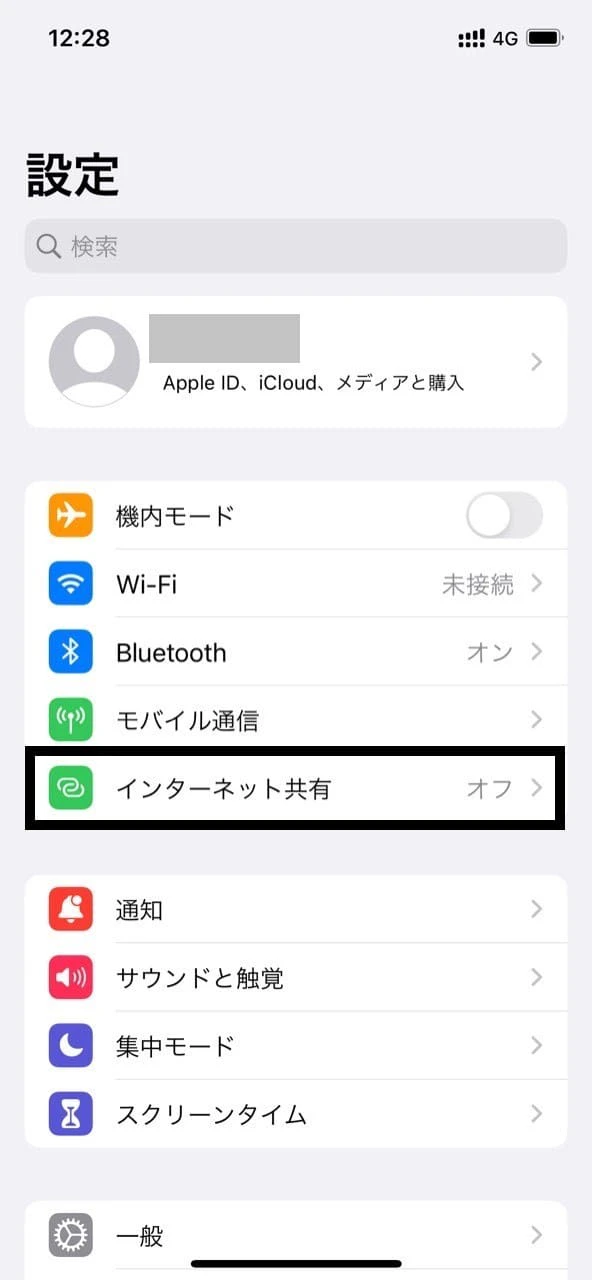
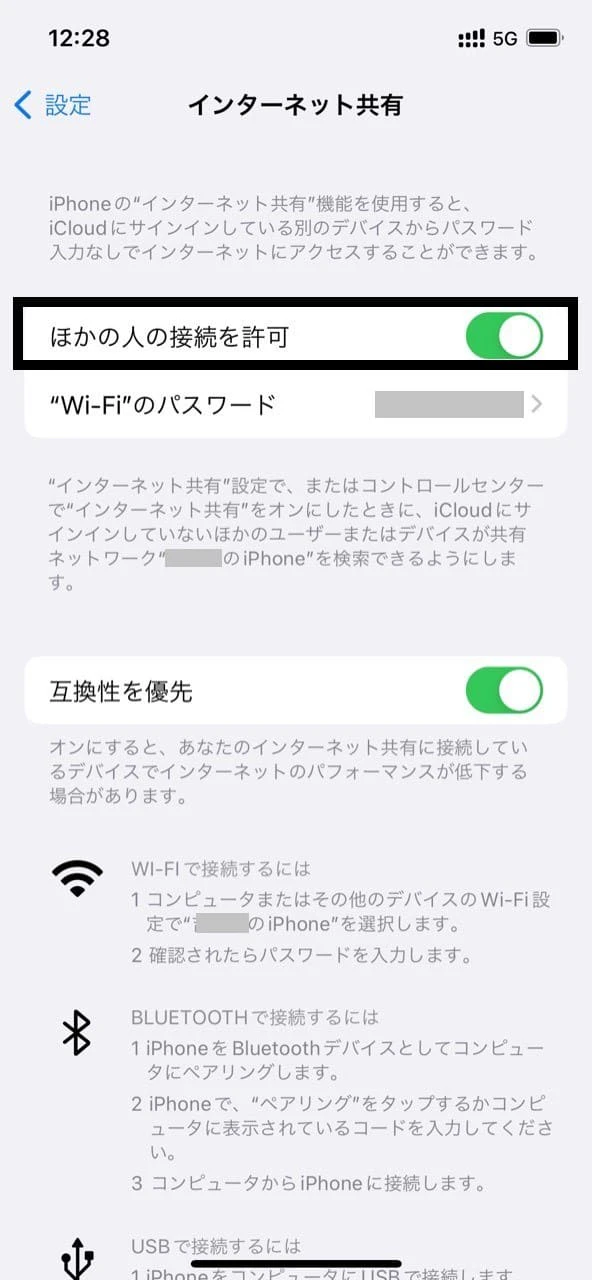
Next, open the computer that you want to connect to the Internet and proceed with the following settings.
That's it! It's that easy!
For more information on tethering with an iPhone, please click here .
Next, we will explain how to tether on Android. Open your smartphone and follow the steps below.
*Android settings may vary depending on the model.
From here, enter the access point and password you set up into your computer.
Like the iPhone, it's very easy to set up.
So far, we have introduced the benefits and usage of povo2.0 tethering. Take advantage of povo2.0 tethering, which can be used easily whenever you want, to create a comfortable internet environment even when you are on a business trip.