When purchasing a new smartphone, you may be wondering how much storage space you should choose. The appropriate capacity varies depending on how you use your smartphone.
In this article, we will explain how to choose the storage capacity you need for your smartphone and what to do if your storage capacity is full.
First, let's look at the storage capacity of smartphones.
Smartphone storage refers to the long-term storage of data such as photos, videos, music, and apps. Storage capacity is measured in bytes (B) and is divided into the following categories:
・1B (byte): 1B
・1KB (kilobyte): 1024B
・1MB (megabyte): 1024KB (approximately 1 million B)
・1GB (gigabyte): 1024MB (approximately 1 billion B)
・1TB (terabyte): 1024GB (approximately 1 trillion B)
If your smartphone's storage space is running low, you may experience problems such as apps running slowly or being unable to open files.
Another thing that is often confused with storage is "memory." Memory is a temporary storage location for data processing. Memory is a short-term storage location for processed data, and the stored data is lost when the power is turned off.
On the other hand, storage stores data for a long period of time, so unless you delete the data, it will not be lost even if you turn off your smartphone. In addition, storage has a slower processing speed than memory, but it can record large amounts of data.
Smartphones are becoming more powerful every year, and as a result, the file sizes of photos, videos, apps, etc. are getting larger. Furthermore, each time the OS is updated, the update data must be downloaded. As you use your smartphone, this data accumulates internally, reducing storage capacity.
Insufficient storage space can cause various problems with your smartphone. Here, we will look at specific issues that can occur due to insufficient storage space.
When storage space is insufficient, the overall performance of the device will slow down, including issues such as being unable to open files and apps taking a long time to launch and load.
When storage capacity is insufficient, the OS will not function properly and the smartphone will be prone to freezing. Furthermore, as the capacity approaches its limit, the smartphone will be more likely to be forced to restart. This is when the smartphone restarts to delete cache data and temporarily improve performance. If the capacity continues to be insufficient, the smartphone may restart repeatedly.
When the storage capacity is full, you will not be able to save any data, and specific symptoms include not being able to take photos with the camera, not being able to download new apps, and not being able to update the OS.
It will also take longer to share data with online storage. Online storage is a service that stores data files on a server via the Internet. There are various types of online storage, such as Google Drive and iCloud.

iPhones do not have an SD card slot, so you cannot insert an SD card to increase storage capacity later. Unlike iPhones, many Android models can use SD cards, but recently models without SD card slots have also appeared.
Therefore, the larger the smartphone's storage capacity, the more secure it is, but since large capacity models are expensive, it's important to choose a capacity that suits your usage. Storage capacity generally comes in large capacity models ranging from 512GB to 1TB, medium capacity models ranging from 128GB to 256GB, and small capacity models of 64GB or less. Here, we'll explain how to choose a smartphone's storage capacity by type.
512GB/1TB is generally considered a large capacity model and is recommended for people who:
・People who save more than 50,000 photos
・People who download more than 500 apps
・People who download more than 10,000 songs
・People who find it troublesome to organize data
Recent smartphones have high-performance cameras, allowing you to take beautiful, high-quality photos and videos. However, the data size of photos and videos is large, so taking a lot of them will consume a lot of storage space. For this reason, we recommend a smartphone with a large capacity model for people who take a lot of photos and videos.
Additionally, games tend to be graphics-heavy and take up a lot of data. If you use a lot of games, having a certain amount of storage space will make it easier to use them.
Even if you buy music and save it directly to your smartphone, choosing a high-capacity model is a safe bet if you download a lot. Even if you use a streaming music service like Apple Music, you'll need a certain amount of storage space if you want to listen to music offline.
Even with streaming music services, saving music files for offline listening still takes up storage space, but downloading them in advance can help reduce the amount of data you need. The same goes for offline playback of video streaming services like Hulu and Netflix.
Additionally, if you find it troublesome to regularly organize the data stored on your smartphone, choosing a large-capacity model will save you the trouble.
The 128GB/256GB models are medium-capacity models and are recommended for the following people:
・People who save more than 20,000 photos
・People who regularly replace or delete apps
- People who are buying a smartphone for the first time and are unsure about which storage capacity to choose.
The mid-capacity model is well-balanced and will be easy to use for many users. It has a decent amount of storage capacity, but is more affordable than the high-capacity model.
The 64GB model is recommended for the following people:
・People who save photos and videos on online storage
・People who don't use apps much
・People who use streaming music instead of downloading it
・People who want to keep the cost of their smartphones down
Even if you take photos and videos, if you store the data in online storage such as iCloud Photos (formerly iCloud Photo Library) or Google Photos, the 64GB model will be sufficient. Using online storage will save the data in cloud storage, so it won't use up your smartphone's storage capacity.
If you don't use offline playback for music much and enjoy streaming services, you probably won't mind a small storage capacity.
If you're not particularly interested in the latest apps and just want the bare minimum, we recommend the 64GB model.
If you are concerned about your smartphone's storage capacity, here are some ways to deal with it:
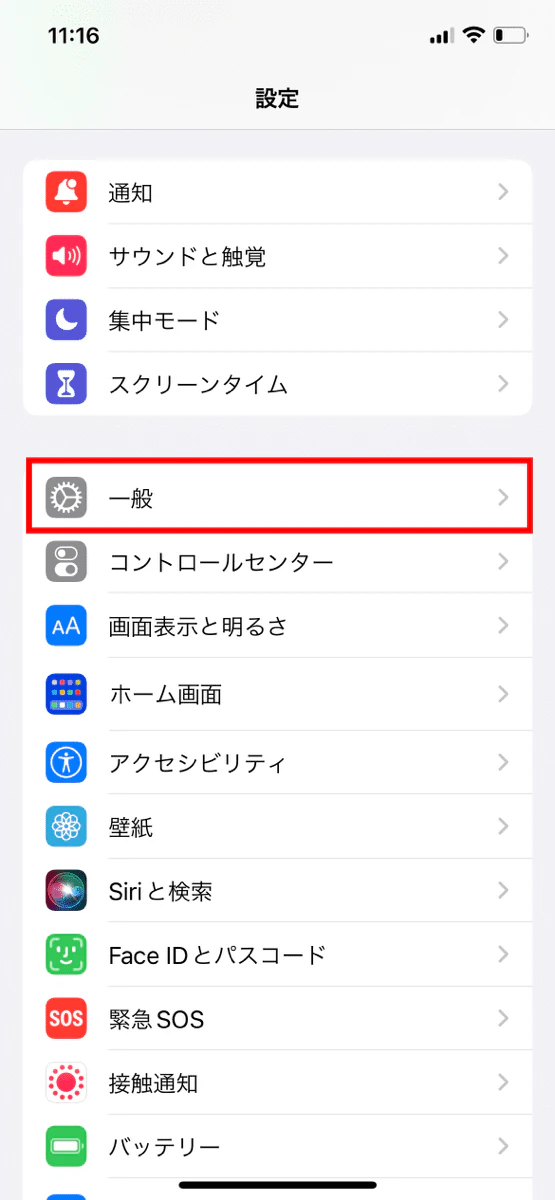
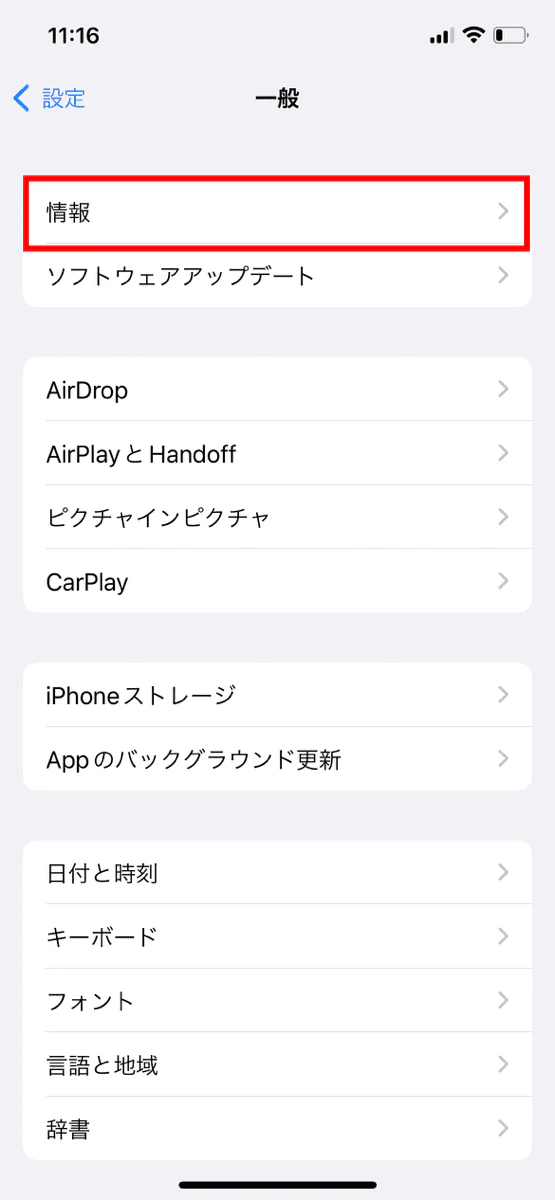
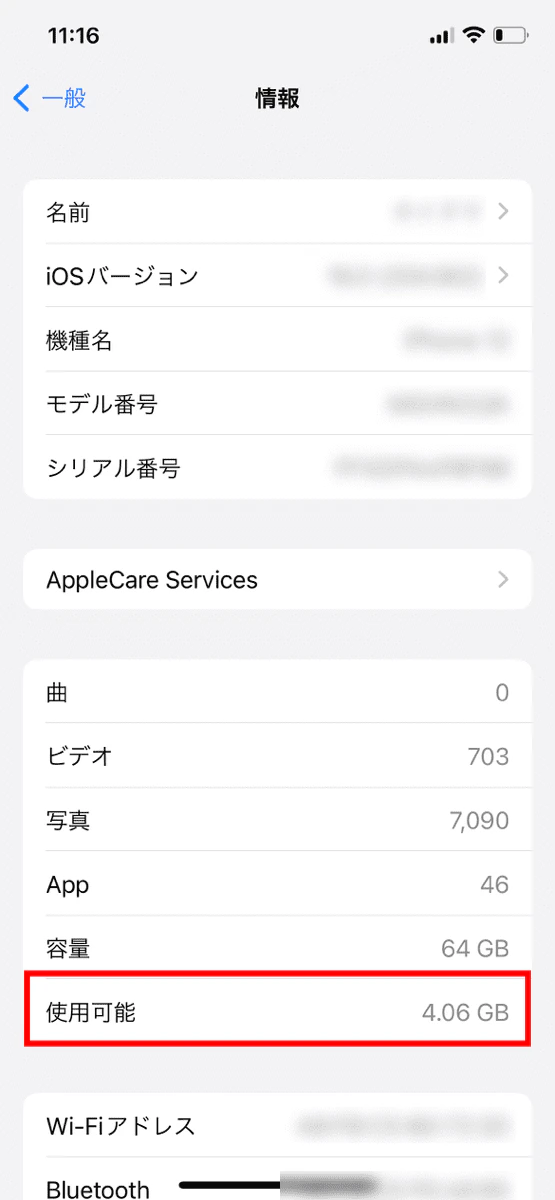
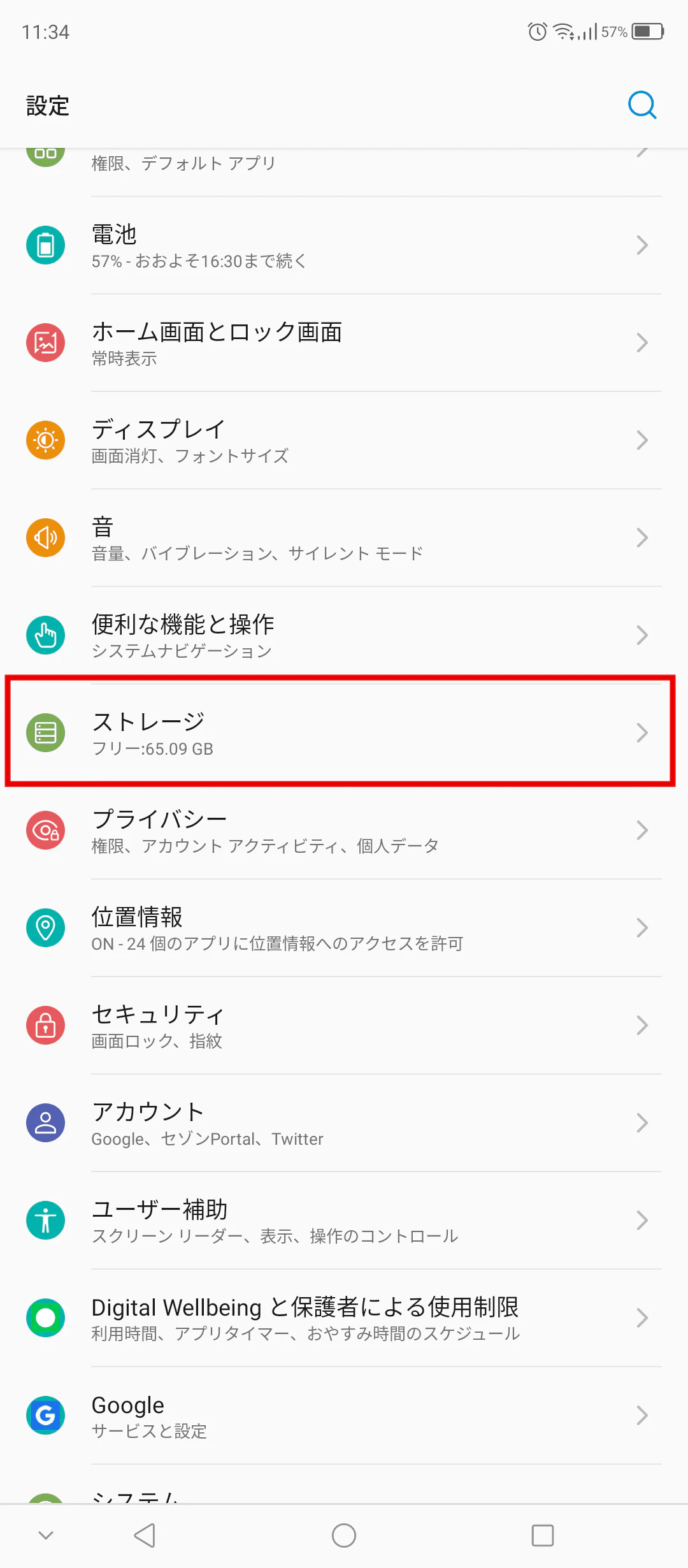
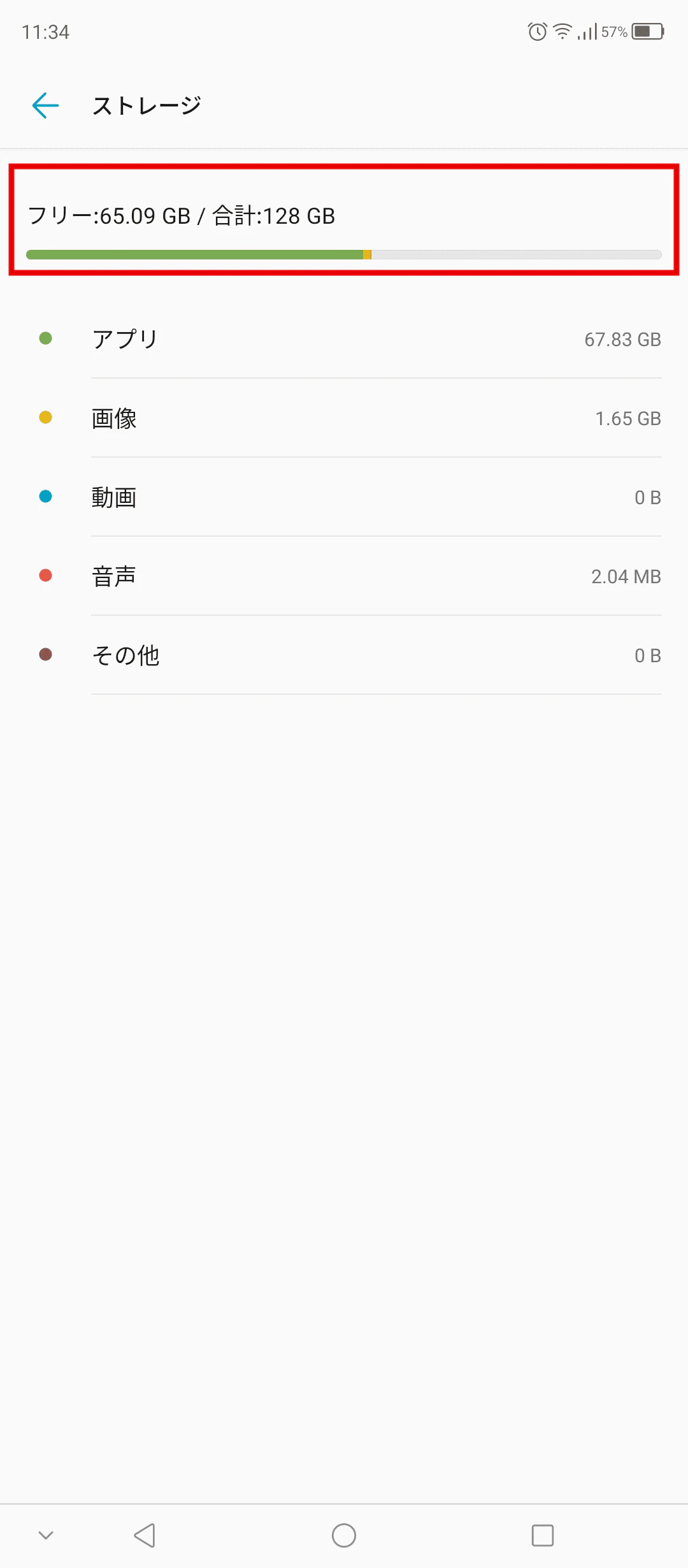
Follow the steps below to check the available storage space on your smartphone.
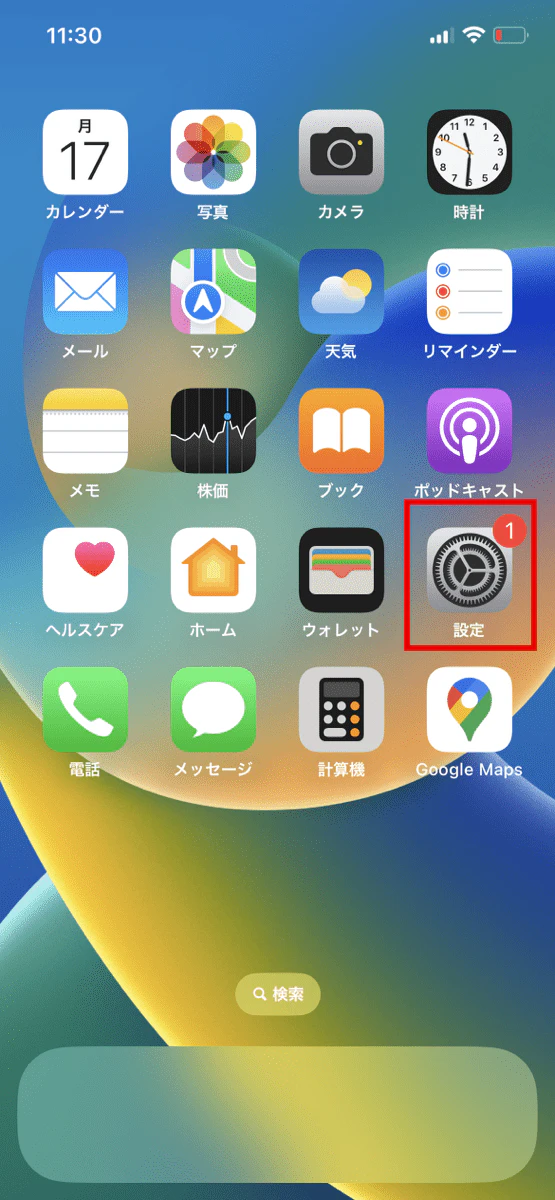
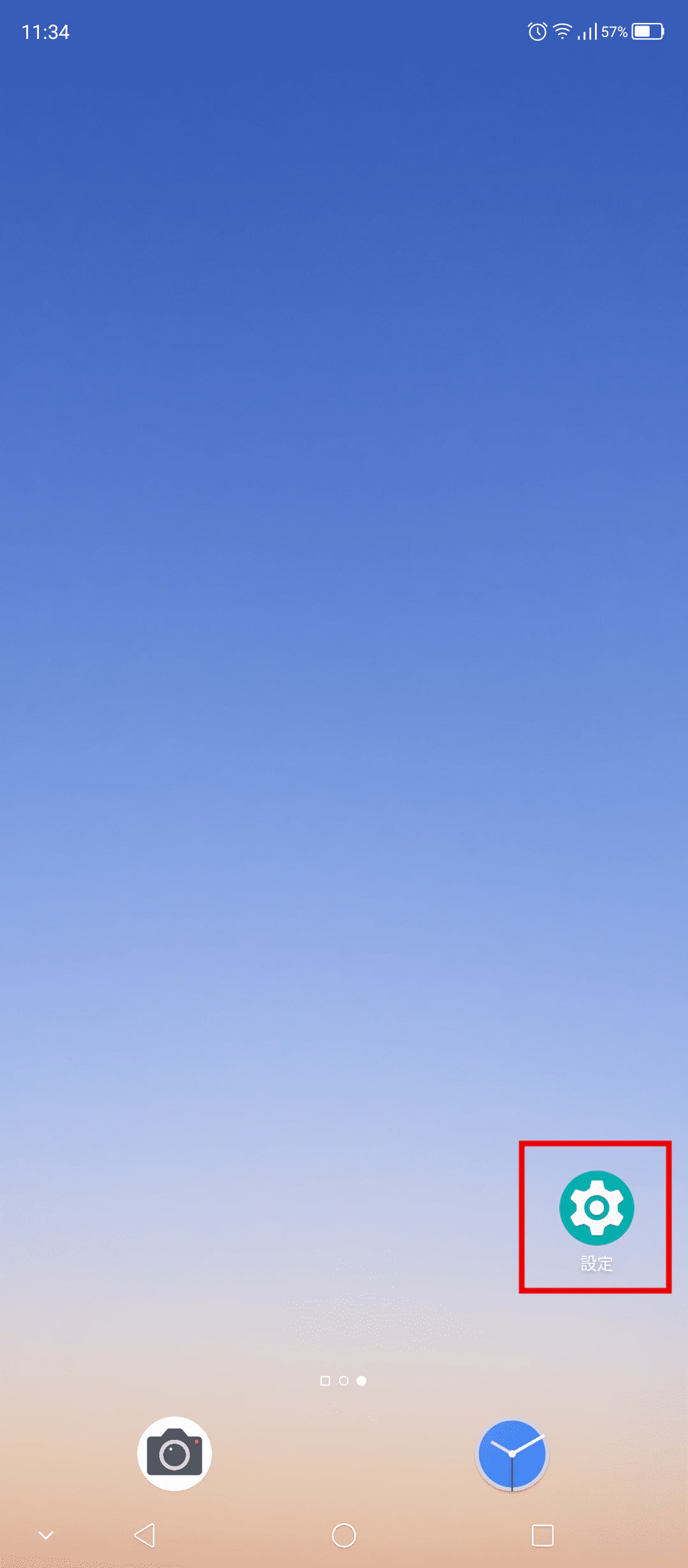
If you are running low on storage space, try the following to free up some space:
Cache is a function that temporarily stores some of the usage information in a browser or app. When you perform the same action in a browser or app, the cached data is called and displayed more quickly than usual.
Browser and app caches grow over time as you use your smartphone, which can cause it to slow down. Regularly delete your browser and app cache to keep your smartphone running smoothly.
However, clearing your cache will also erase your browsing history and login information. When clearing your cache, be sure to keep a note of your account ID and password so that you can re-enter your login information.
Deleting the cache is generally done for each browser and app. For example, you can delete the LINE cache by opening the app and going to "Settings" -> "Talks" -> "Delete Data." Note that deleting the LINE cache will not delete your chats.
Photos and videos taken with a smartphone camera have large file data, so if you have a lot of them, they will take up storage space. To free up storage space on your smartphone, regularly save photos and videos to cloud storage using online storage such as iCloud Photo Library or Google Photos.
However, there is generally a limit to the amount of free online storage available, so it is important to regularly delete unnecessary photos and videos.
Deleting unused apps will free up storage space on your smartphone. It's a good idea to regularly check and organize apps you no longer use.
"povo2.0 (*1)," an online-only brand of au provided by KDDI, can be used with a variety of models, regardless of storage capacity. It also offers a new type of fees plan with a basic fee of 0 yen (*2) (*3) (*4), allowing you to use necessary features as paid Topping.
With povo2.0, you can choose from six types of paid Topping: six types of data, two types of content, two types of voice calls, and one type of support. You can purchase and use the paid Topping you need when you need them, and there are no contract validity restrictions, so if you're considering signing up for a mobile phone contract or switching carriers, why not check out KDDI's povo2.0?
*1: All procedures and support are online only. No in-store or telephone support is available. 2: If there is no purchase of paid Topping for more than 180 days, the use of the service may be suspended or the contract may be terminated.
5 lines under the same name (*) For the cumulative 6th line and thereafter, a contract administration fee of tax included 3,850 yen/line will be charged.
*Includes lines that have been terminated or cancelled by the Company within the past year.
Reference. povo2.0 Plan Details" (povo) 3: For Data Only, initial Topping purchase is required at the time of contract. Calls+Data For domestic calls: tax included 22 yen/30 seconds Some calling charges may differ, such as calls to satellite phones. For more information The company will charge a specified rate for calls to the following numbers. In addition, designated call charges will apply to phone numbers set by other companies to fees. Sending domestic SMS: tax included 3.3 yen/text (up to 70 characters) Receiving: Free Up to 670 full-width characters can be sent depending on the model. However, up to 134 characters will be charged for two SMS, and after that, one SMS will be charged for every 67 characters. *4: When 0 yen and 0 GB, the maximum sending/receiving speed is 128 kbps. The names of products and services mentioned in this article are trademarks or registered trademarks of the respective companies. Apple and iPhone are trademarks of Apple Inc. registered in the U.S. and other countries. iPhone trademark is used under license from Aiphone K.K. TM and (C) 2022 Apple Inc. All rights reserved. Android and Google are trademarks of Google LLC. LINE" is a trademark or registered trademark of LINE Corporation. au is a registered trademark of KDDI Corporation. Hulu" is a registered trademark of Hulu, LLC.