International Roaming

New customers signing up after October 3, 2025 can use international roaming by completing the application procedures specified by our company. After signing up, please contact povo support (chat window).

Recommended points

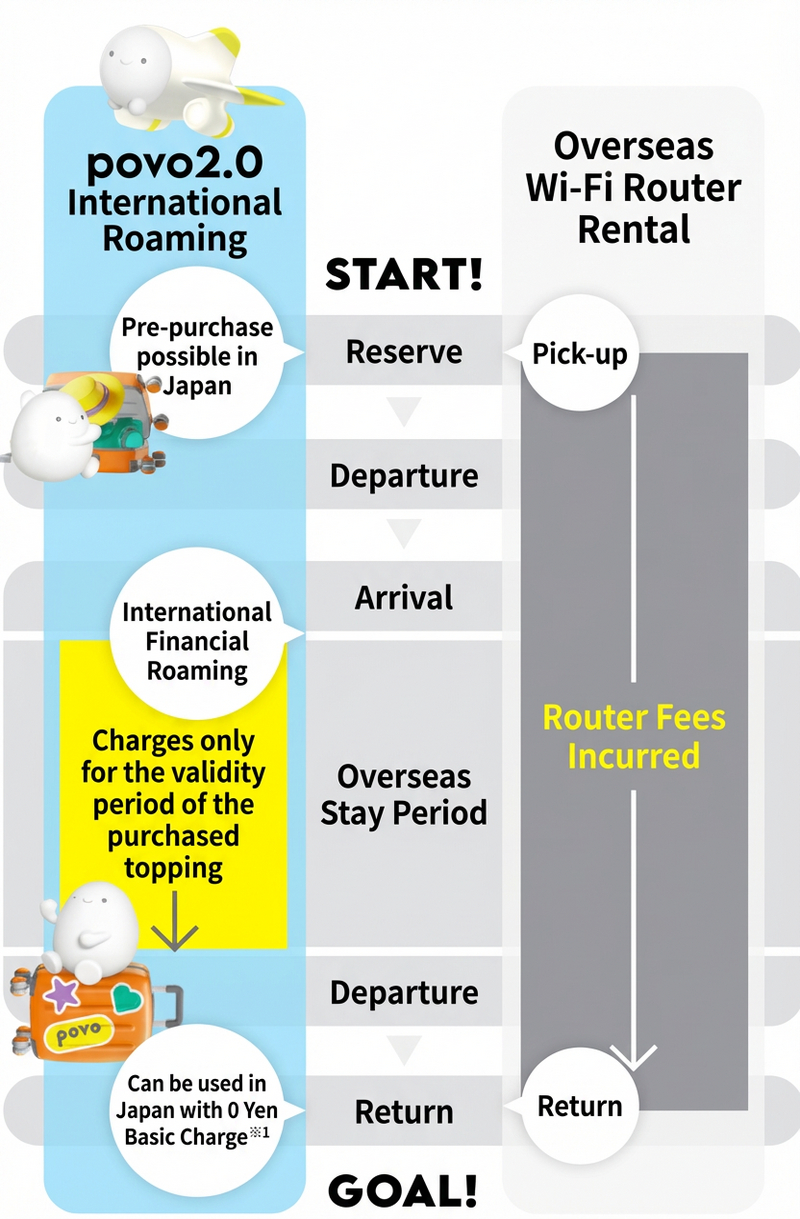
POINT 1No need to replace SIM
alt_txt
POINT 2No Wi-Fi router required
alt_txt
POINT 3Locally, anytime
Data can be purchased
alt_txt

Voice calls and SMS

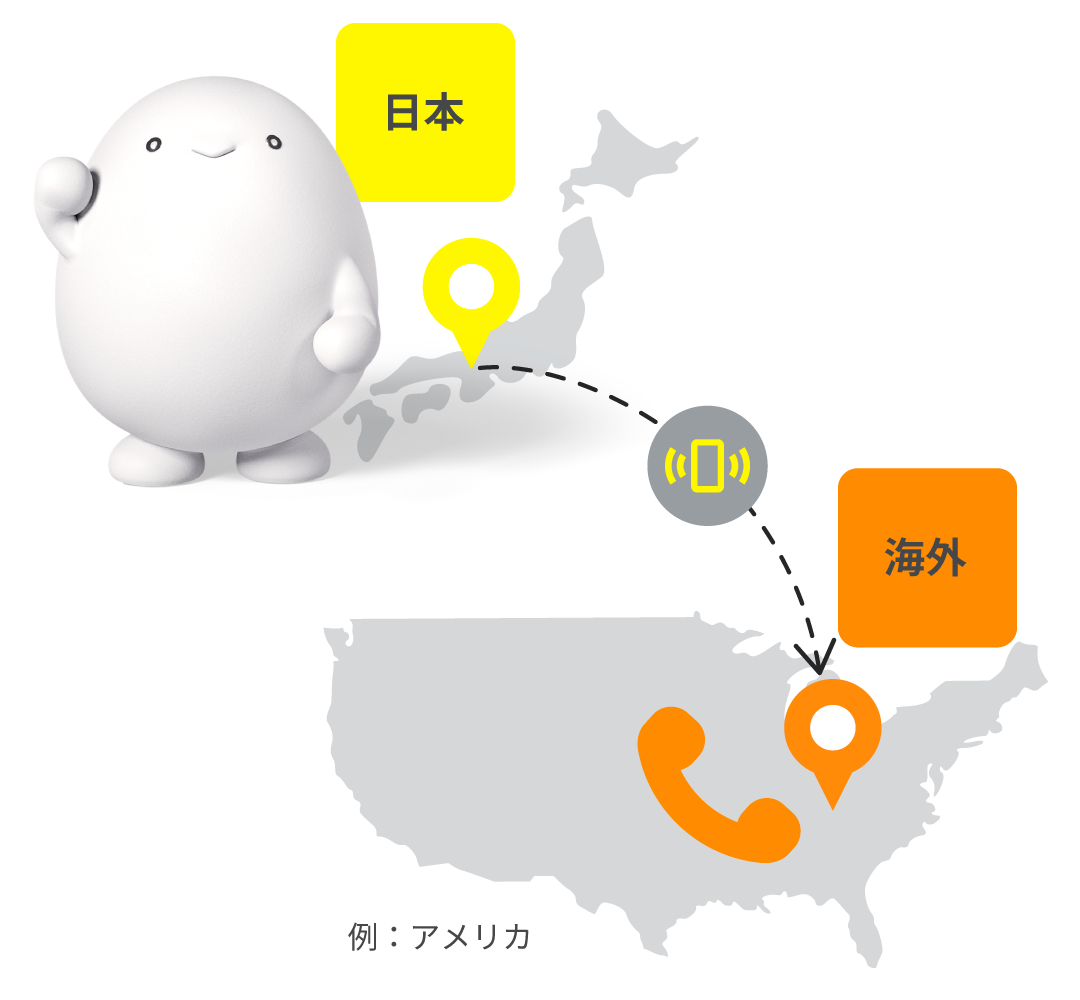
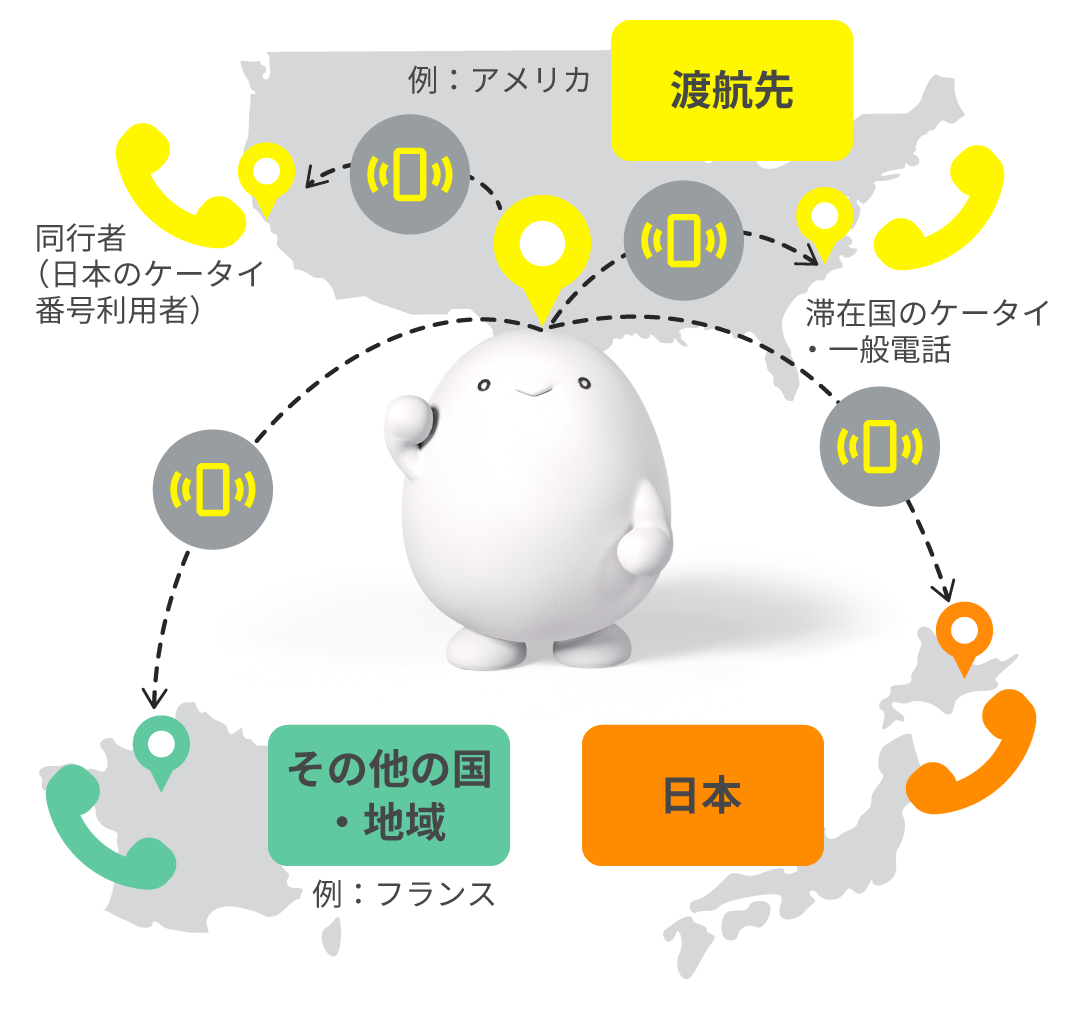
You can use your phone number to make voice calls and send SMS in over 200 countries and regions overseas.

fees examples for popular destinations

Voice calls SMS
Outgoing calls (within the country of stay) Outgoing (to Japan) Outgoing calls (outside Japan) Incoming call Send Reception
South Korea 50 yen/min 125 yen/min 265 yen/min 70 yen/min 100 yen/transaction* Free
U.S. 120 yen/min 140 yen/min 210 yen/min 165 yen/min
Thailand 70 yen/min 175 yen/min 265 yen/min 155 yen/min
* fees is for up to 70 full-width characters. Up to 134 characters, the fee is for two messages, and for every 67 characters thereafter, fees is for one message. *Not available with "povo2.0 Data Only."
* fees vary depending on your destination. * Call and communication charges may apply even when using toll-free numbers (toll-free numbers), collect calls, credit calls, prepaid calls, or operator-assisted calls overseas. You cannot connect to toll-free numbers in Japan. * fees also apply when receiving voice calls. * Click here for instructions on making and receiving voice calls * Click here for differences from international telephone services

Three Overseas data Topping

It is available in over 160 countries and regions, and can be purchased in advance before traveling or after arriving.

Area Topping
~Recommended for those planning to travel to specific countries and regions~

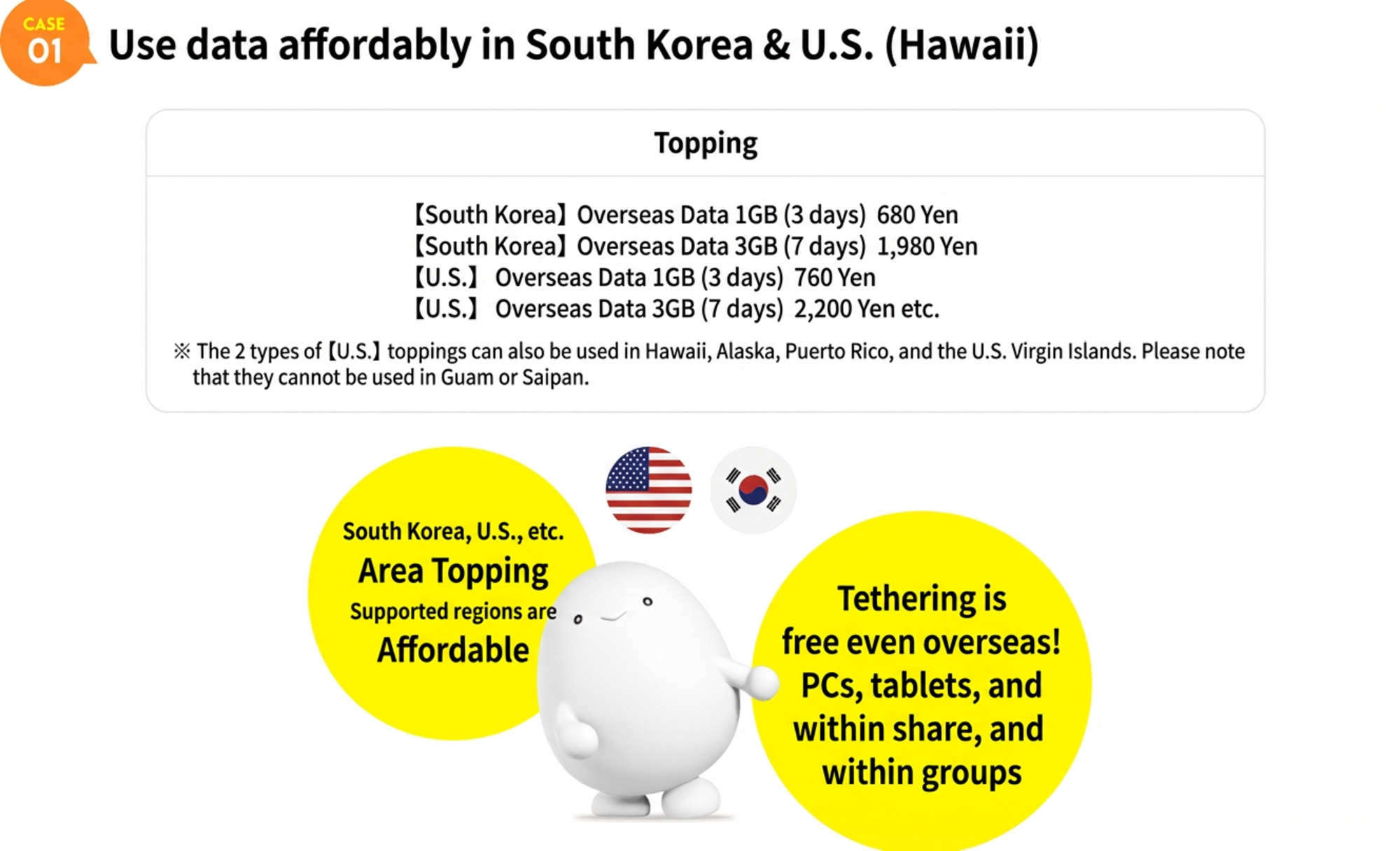
You can use it at a discount in eligible countries and regions, including South Korea, the United States *1, nine European countries (UK, Italy, Austria, the Netherlands, Switzerland, Spain, Germany, France, and Belgium) *2, Taiwan, China, Hong Kong, and Macau, Thailand and Vietnam, and Singapore and Malaysia.

*1 
 This service is also available in Hawaii, Alaska, Puerto Rico, and the U.S. Virgin Islands. Please note that it is not available in Guam or Saipan.
*2 
 Also available in Liechtenstein, San Marino, Vatican City, Canary Islands, Spanish North Africa, Guernsey, Isle of Man and Jersey. Please note that this service is not available in French Guiana or the British Virgin Islands.

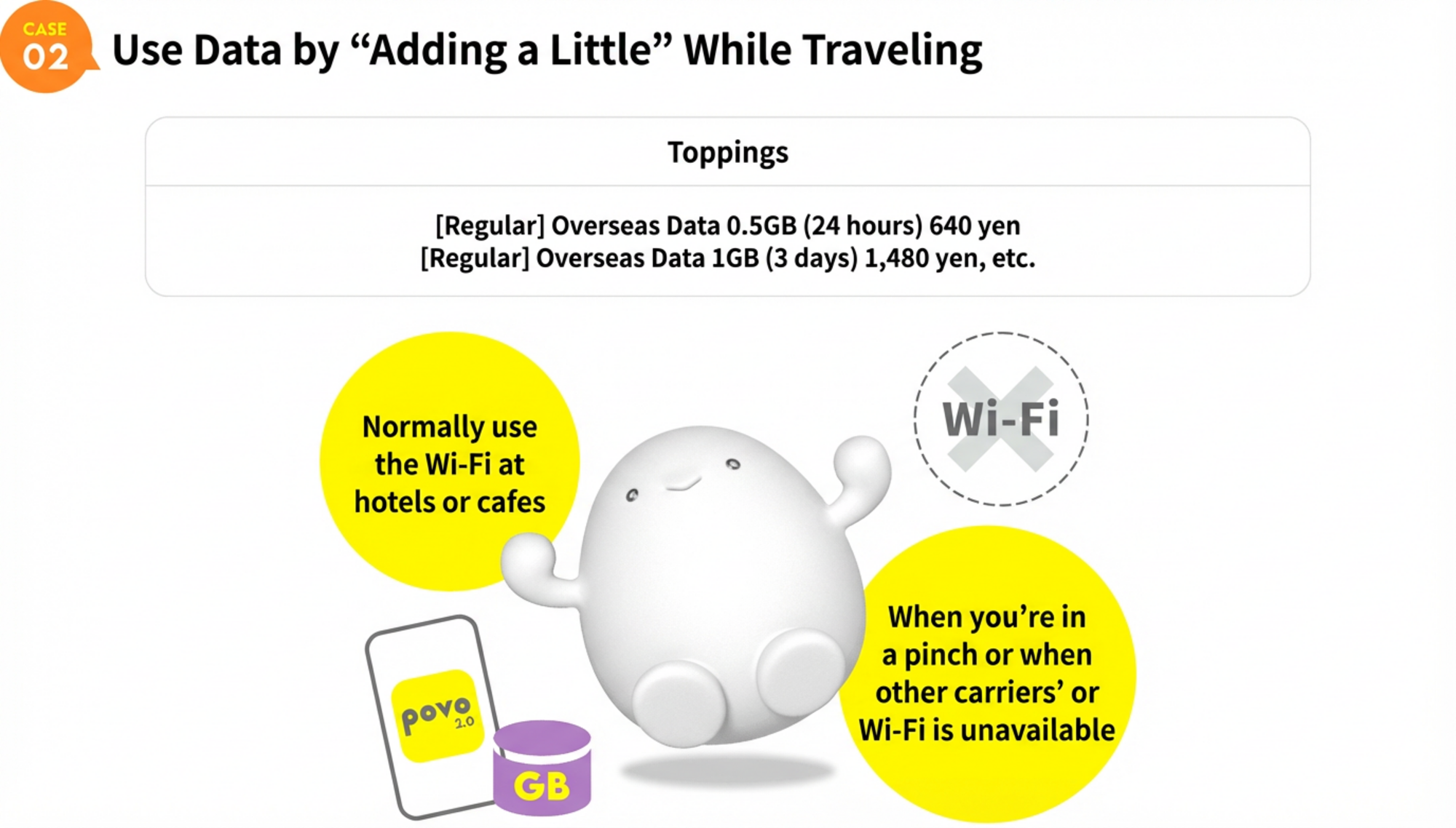
Regular Topping
~Recommended for those planning to travel to multiple countries and regions~

This data Topping is available in over 90 countries and regions, including Australia, the Philippines, Guam, Indonesia, and New Zealand.

Wide Topping
~Recommended for those planning to travel to multiple countries and regions~

This data Topping is available in over 160 countries and regions, including the United Arab Emirates, Qatar, and South Africa.
(Available in more countries and regions than regular Topping)

Topping name (validity) Amount / per
【Wide】
Overseas data 0.3GB (30 days)
6,980円
  • Starting September 19, 2023, 5G high-speed communications will be available overseas. (Click here for a list of supported countries and regions.)
  • To use data communications overseas, you will need to purchase an "Overseas data Topping."
  • Overseas data Topping cannot be purchased with "povo2.0 Data Only."
  • Even if you have not purchased Topping, if you are already logged in to the povo2.0 app, you can purchase the "Overseas data Topping" even if you do not have an external internet connection such as Wi-Fi. Please note that if you are not logged in to the app, you will need a separate internet connection to log in.
  • The countries and regions where you can use the service vary depending on the type of Overseas data Topping. (Click here for supported countries and regions.)
  • After purchasing the Overseas data Topping, you will be in a standby state for 30 days until you can connect to data communication in an available area.
  • Topping validity begins from the start time of use.
    (For example, if you purchase an Overseas data Topping that can be used 24 hours a day on July 15th and start using it at your destination at 15:00 on August 1st, the usage period will end at 14:59 on August 2nd.)
  • While an Overseas data Topping or overseas data bonus is being applied, you will not be able to purchase a new Overseas data Topping or apply an overseas data bonus.
<Notes>
*If you switch or reissue your SIM card while using Overseas Data Toppings at your destination, you will not be able to use your remaining data allowance. Furthermore, you cannot repurchase Overseas Data Toppings until validity. If you wish to switch or reissue your SIM card, please do so before starting Overseas Data Toppings. *If overseas voice call/SMS Amount become excessive, your service may be temporarily suspended. *Depending on the communication conditions at your destination, partner carriers and service areas may change or service may not be available.  *Even within available cities and areas, service may not be available due to terrain or location conditions. *Depending on your model, your service may not be available overseas. Also, available countries, regions, and communication services vary by model. *For models purchased from au or UQ, you can check the availability of data, voice, and SMS services here. *For other models, please confirm availability (e.g., whether your device is compatible with the communication methods and frequencies provided by the carrier in your destination country). *Overseas Data Toppings cannot be used within Japan. *Consumption tax will not be added to the international roaming service Amount.

Recommended points

It is available in over 160 countries and regions, and can be purchased in advance before traveling or after arriving.

1You can purchase tickets at any time through the app according to your travel destination and validity.

CASE01 Recommendation: Use data at a discount in the United States (Hawaii)
*Please note that availability may vary depending on the model you are using.
CASE02 Recommendation: Use data in the United States (Hawaii) for great savings

2You can purchase only the amount of data you need, so you are less likely to incur unnecessary amount or data usage.

CASE01
*Call charges, etc. are charged separately. Certain conditions apply for continuous use for more than 180 days. Domestic 0 yen 0GB 128kbps, when using overseas data communication, purchase of "Overseas data Topping" is required. *If you have a contract for 5 lines (*) under the same name, a contract administration fee of 3,850 yen (tax included included) per line will be charged for the 6th line and beyond. *This includes lines that have been cancelled or canceled by our company within the past year.

How to use our service

Things to do before you travel

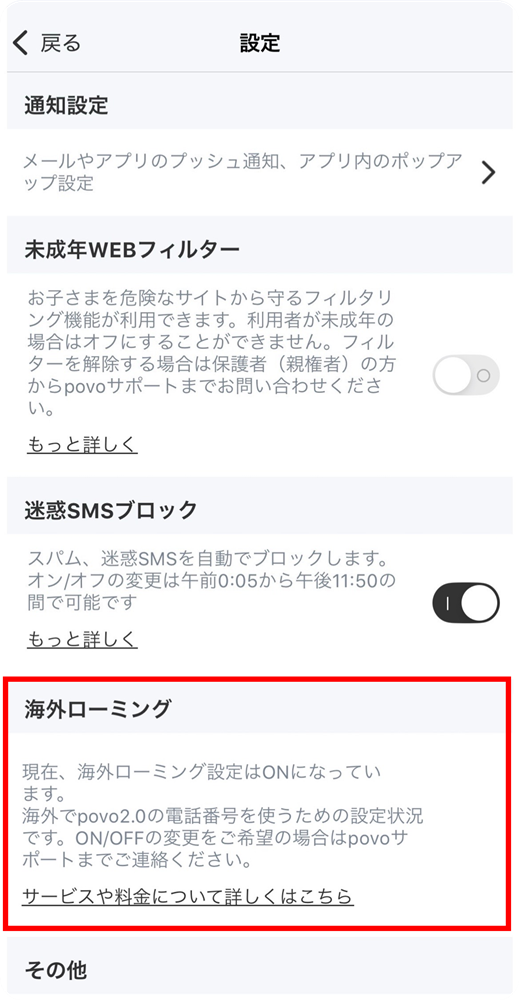
1Check that the international roaming setting is ON in the povo2.0 app "Settings"

*If you wish to change the setting to ON/OFF, please contact povo support. *When making an inquiry, we will need to verify your identity. Please have your driver's license, My Number card, residence card, etc. ready when you contact us. *App version 1.7.0 or later is required to use this feature.

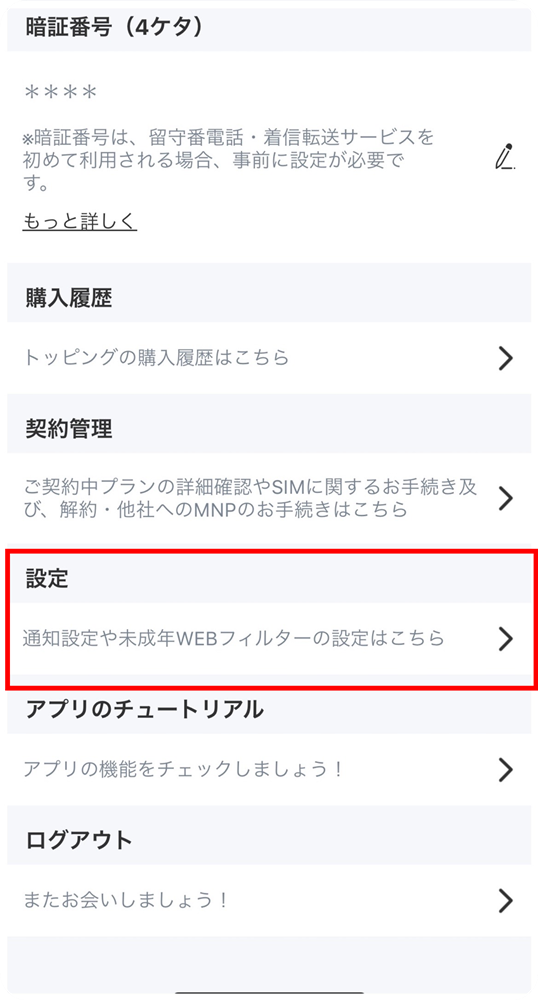
How to check the international roaming settings of the povo2.0 app

  • STEP 1

    Select "Profile" on the top left of the home screen

  • STEP 2

    Select "Settings"

  • STEP 3

    Make sure that "International Roaming" is turned on

2Check whether your device is available in the country/region you are traveling to

*Depending on the model you are using, it may not be possible to use your phone overseas. Also, the countries, regions, and communication services available vary depending on the model. *For models purchased from au or UQ, you can check the availability of data communication, voice, and SMS above. If you are using any other model, please check for yourself whether it is available (whether the communication methods and frequencies provided by the telecommunications carrier in your destination are compatible with your device, etc.).

3Turn on the settings on your device

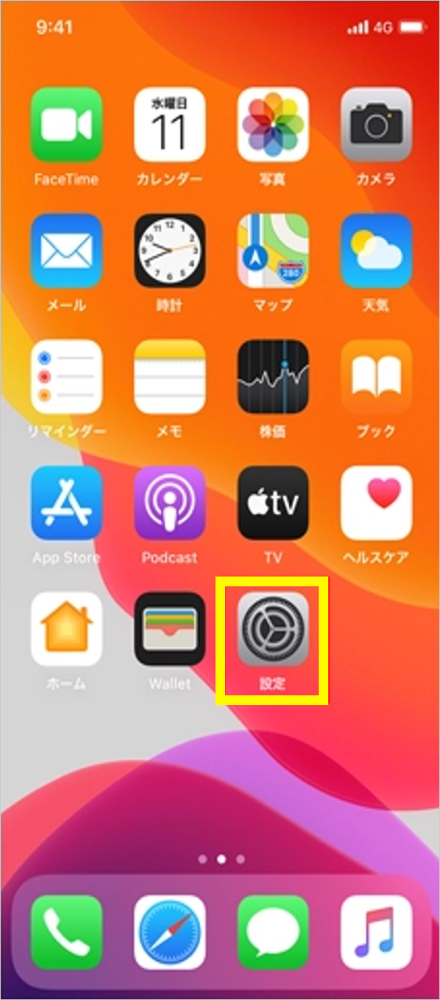
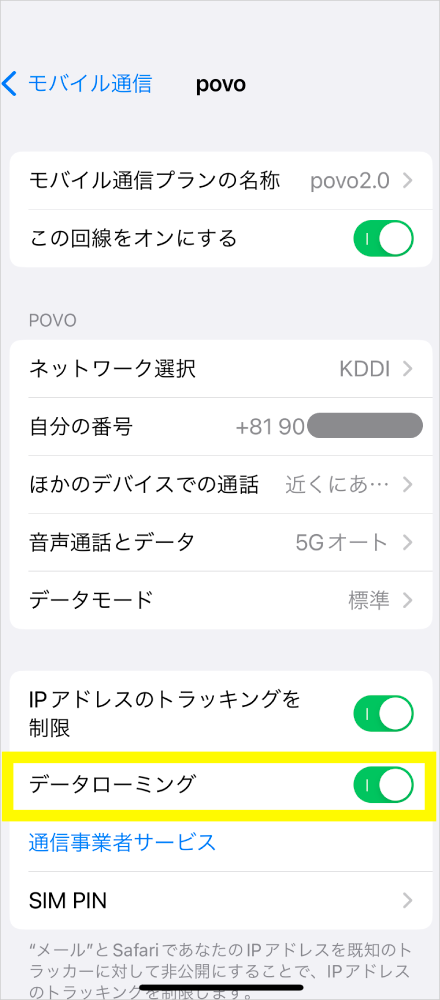
If you have more than one SIM card on your iPhone

  • STEP 1
    alt_txt

    Select "Settings"

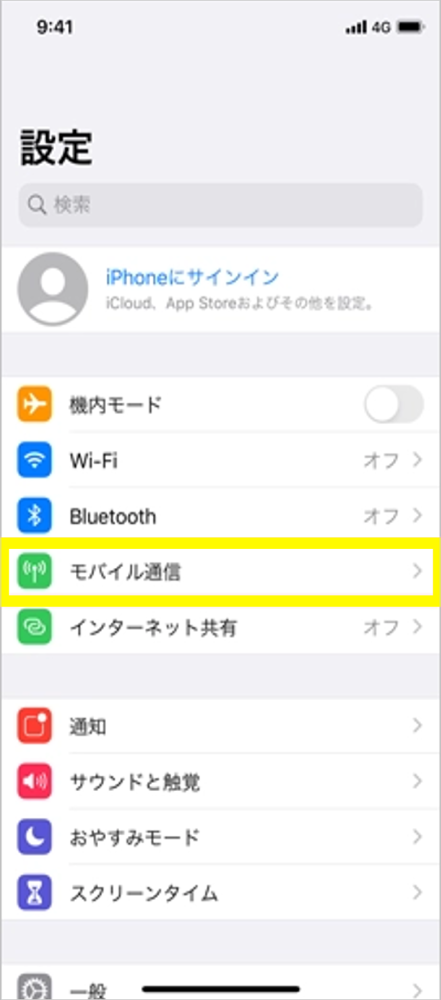
  • STEP 2
    alt_txt

    Select "Mobile Data"

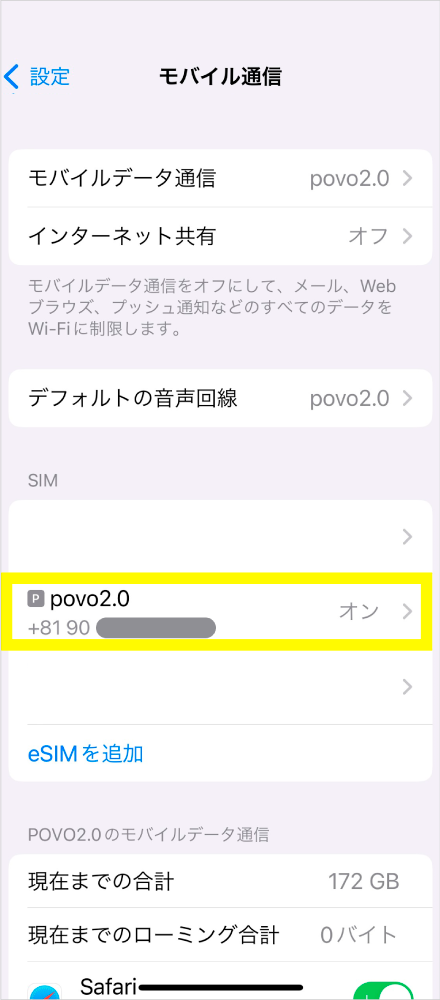
  • STEP 3
    alt_txt

    Select the "povo2.0" SIM

  • STEP 4
    alt_txt

    Turn on "Data Roaming"

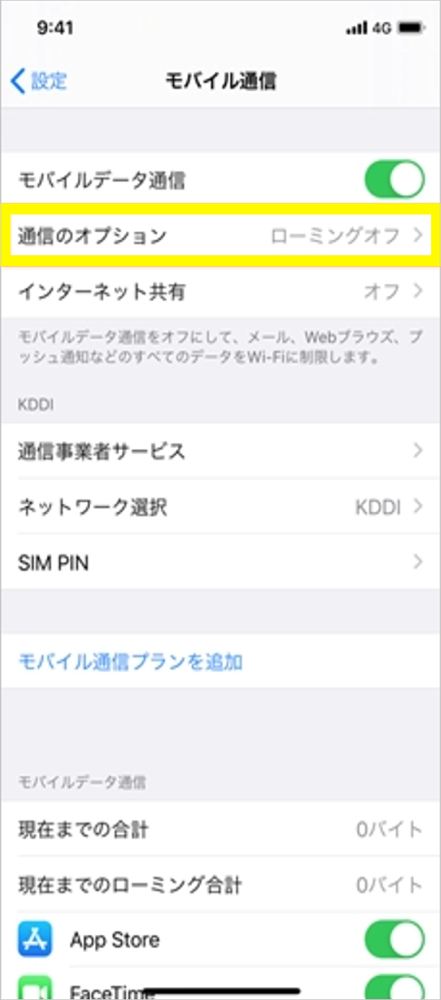
If you are using only a povo2.0 SIM on your iPhone

  • STEP 1
    alt_txt

    Select "Settings"

  • STEP 2
    alt_txt

    Select "Mobile Data"

  • STEP 3
    alt_txt

    Select "Communication Options"

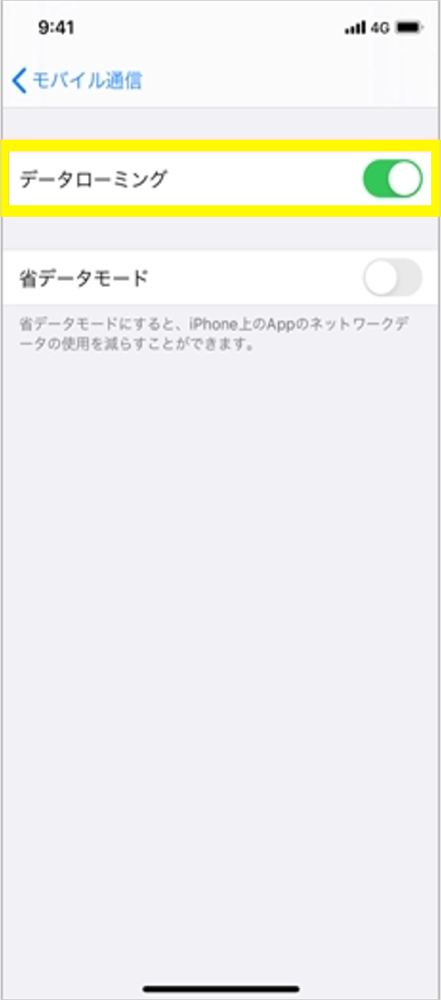
  • STEP 4
    alt_txt

    Turn on "Data Roaming"

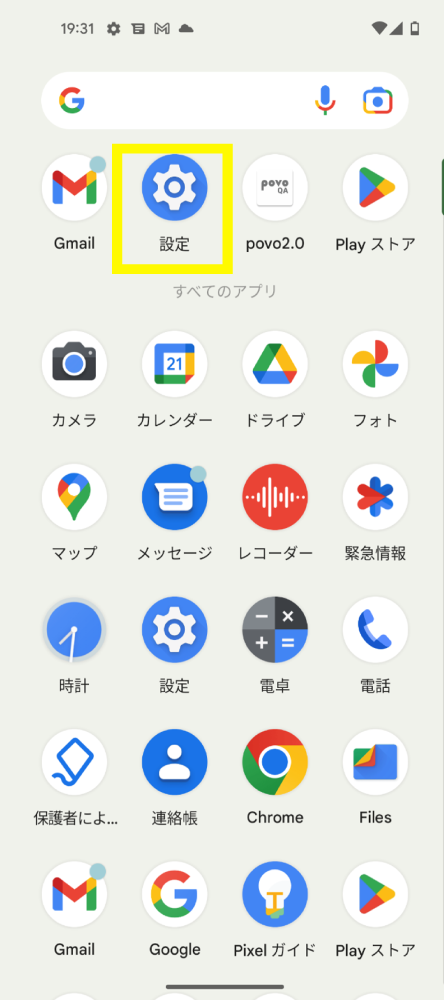
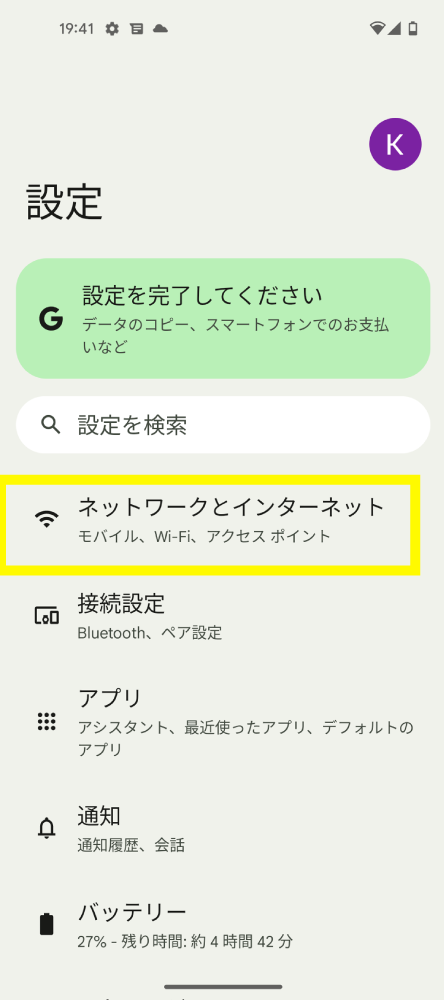
For Android

  • STEP 1
    alt_txt

    Select "Settings"

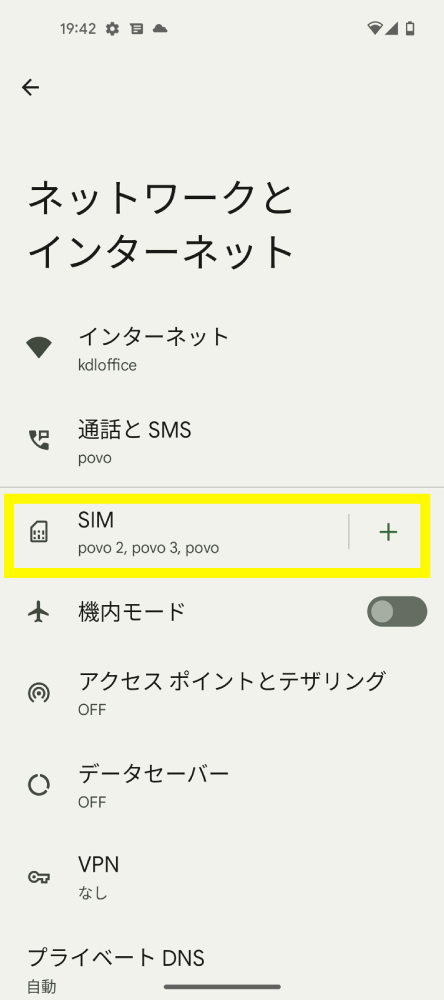
  • STEP 2
    alt_txt

    Select "Network and Internet"

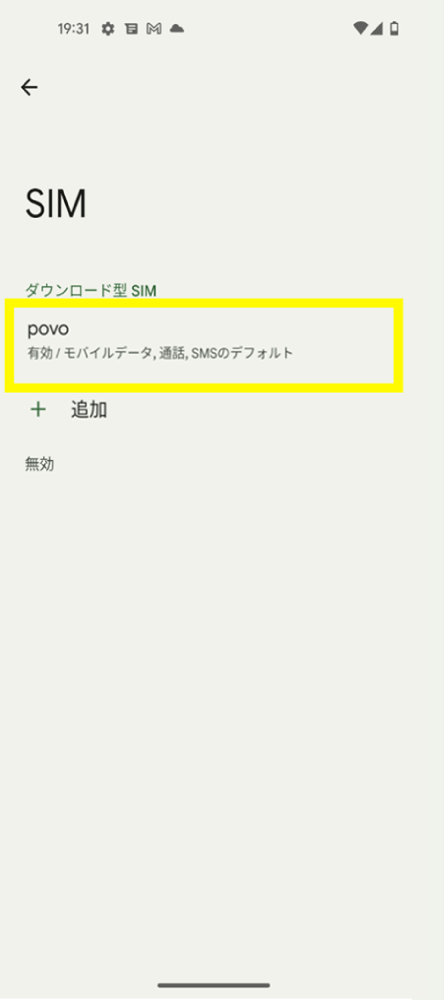
  • STEP 3
    alt_txt

    Select "SIM"

  • STEP 4
    alt_txt

    Select the "povo2.0" SIM

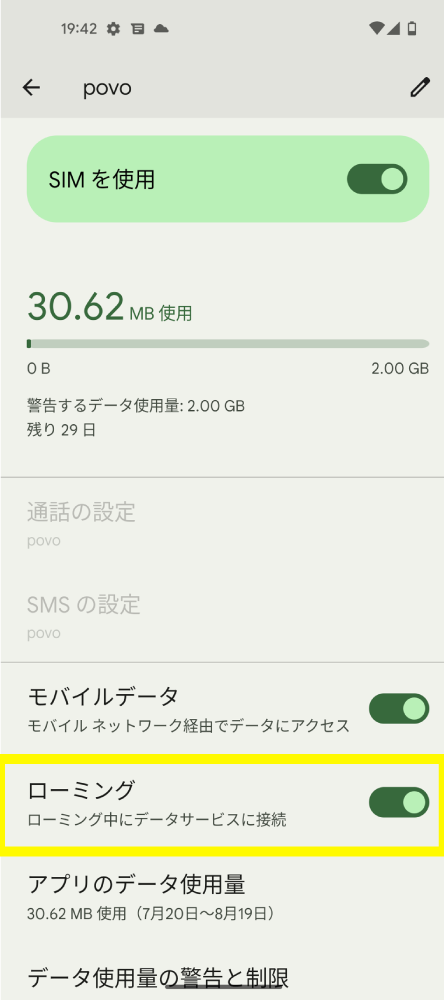
  • STEP 5
    alt_txt

    Turn on "Roaming"

*Some menu names and setting procedures may differ depending on the model, OS version, and SIM setting status. For details, please refer to the instruction manual or user manual provided by the manufacturer of your model.

4When using overseas data Toppings, you can purchase it in advance in Japan after your trip is confirmed.
(Overseas Data Toppings will be in standby mode after purchase, with a 30-day limit for data connection in available areas.)

Application procedure for povo2.0 app

  • STEP 1
    alt_txt

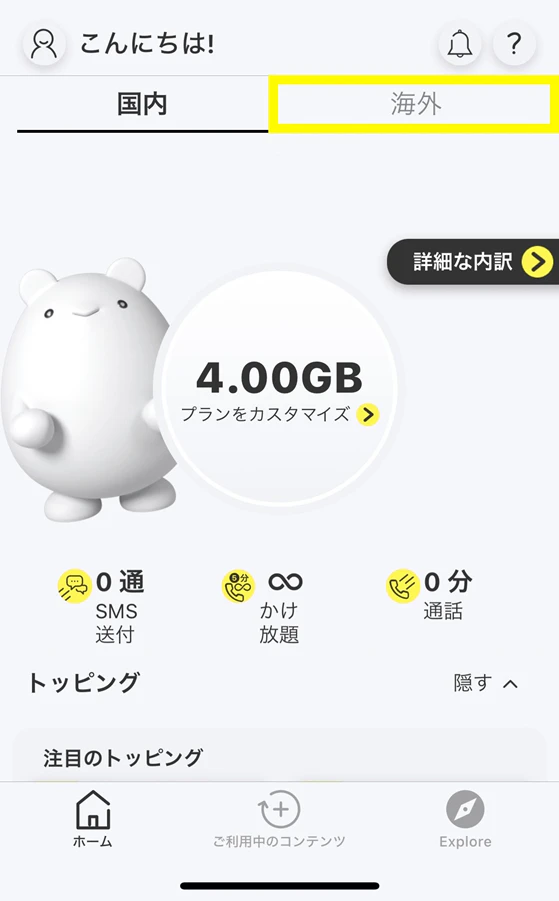
    Select "Overseas" on the home screen of povo2.0 app

  • STEP 2
    alt_txt

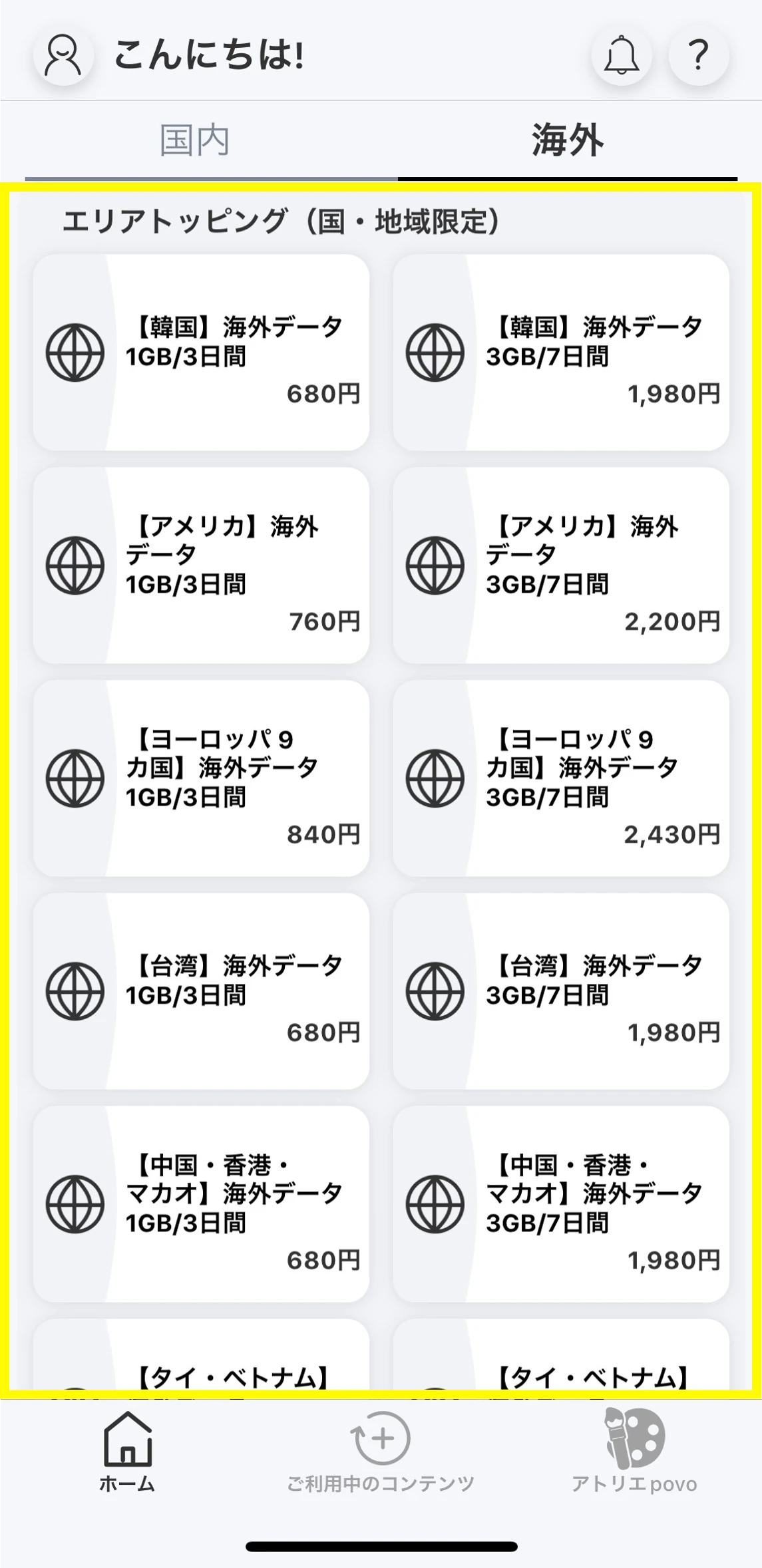
    Select Overseas data Topping you want to purchase on the overseas home screen

  • STEP 3
    alt_txt

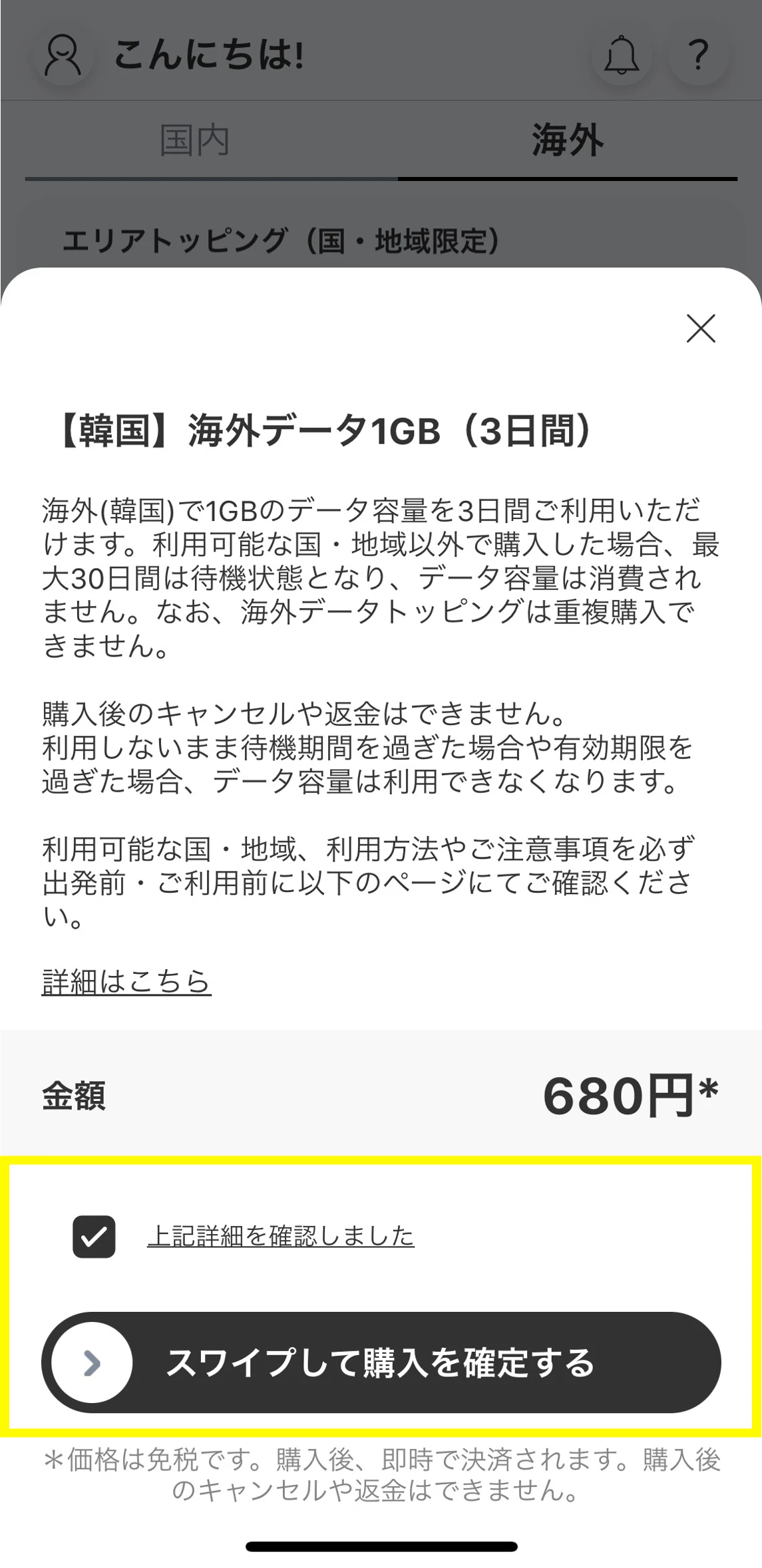
    After reading the instructions in the pop-up, check "I have confirmed the above details" and swipe from left to right on the "Swipe to confirm purchase" button.

  • STEP 4
    alt_txt

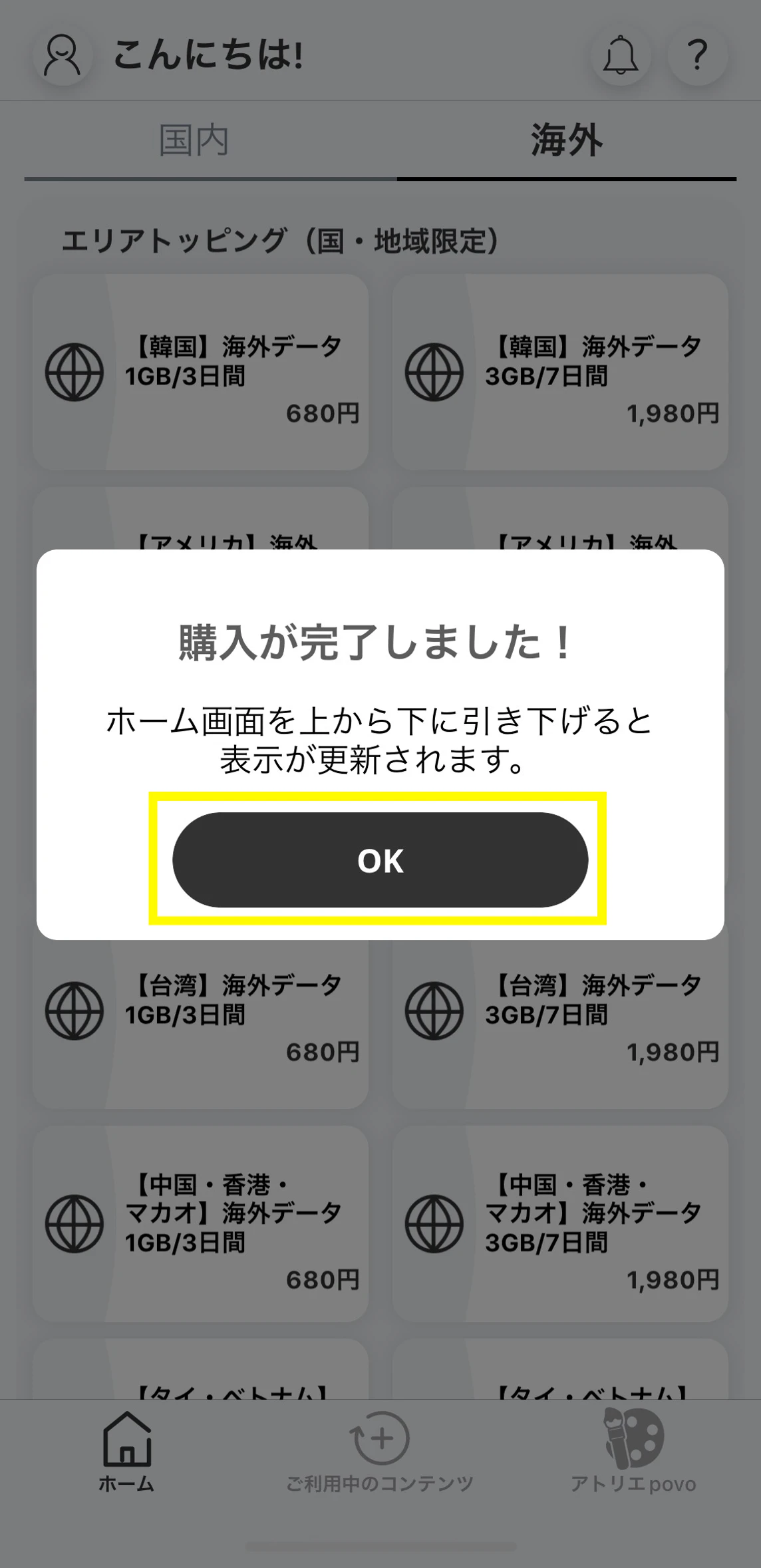
    A purchase completion message will appear, so tap "OK" (pull down from the top of the home screen to refresh the display)

  • STEP 5
    alt_txt

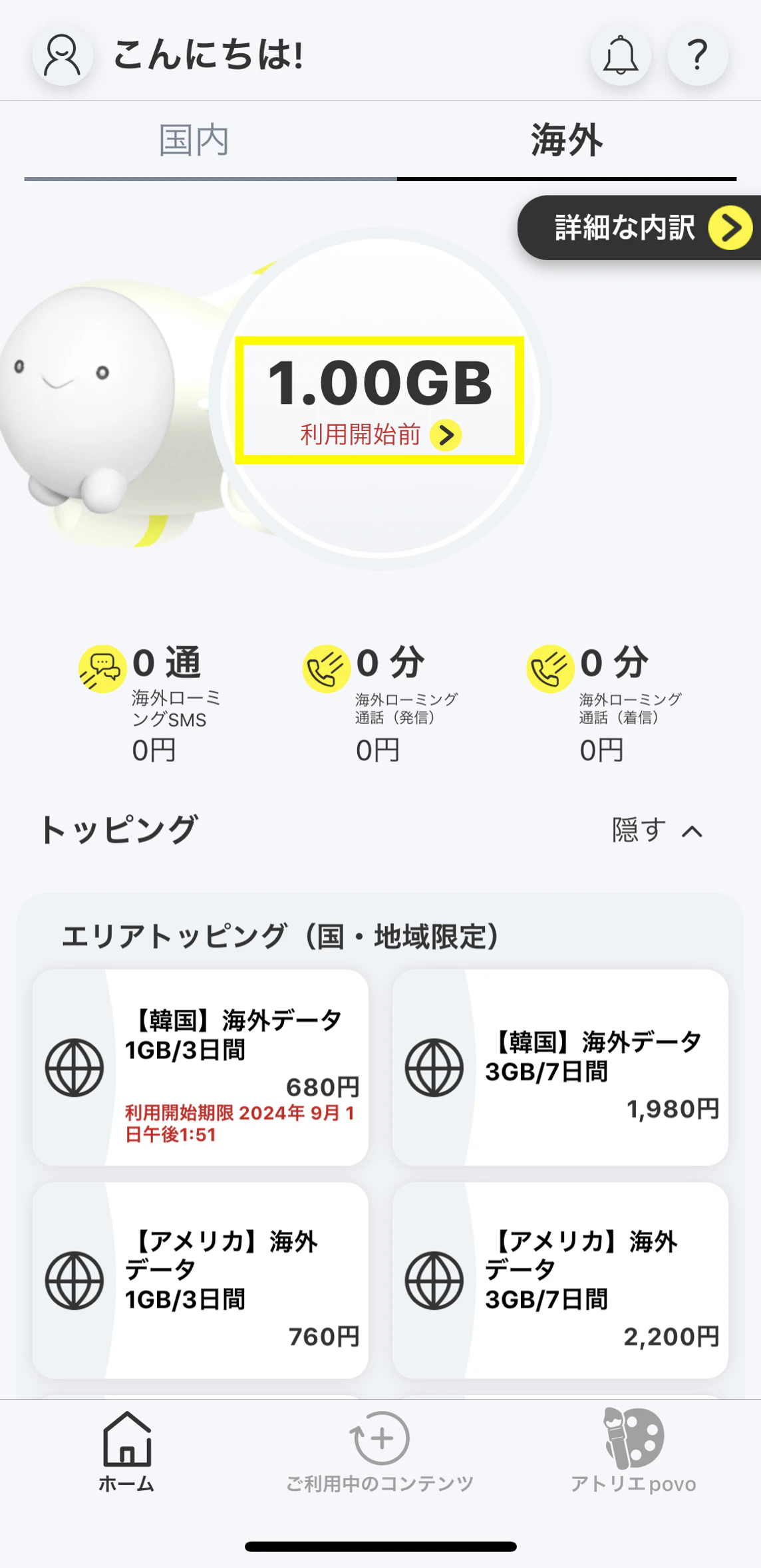
    The remaining data capacity will be displayed before use, and you will be on standby for 30 days until you can connect to data communication in an area where it is available. We recommend purchasing the plan before you travel.

    *It may take up to one minute for the changes to be applied, so please wait until they are reflected.

  • STEP 6
    alt_txt

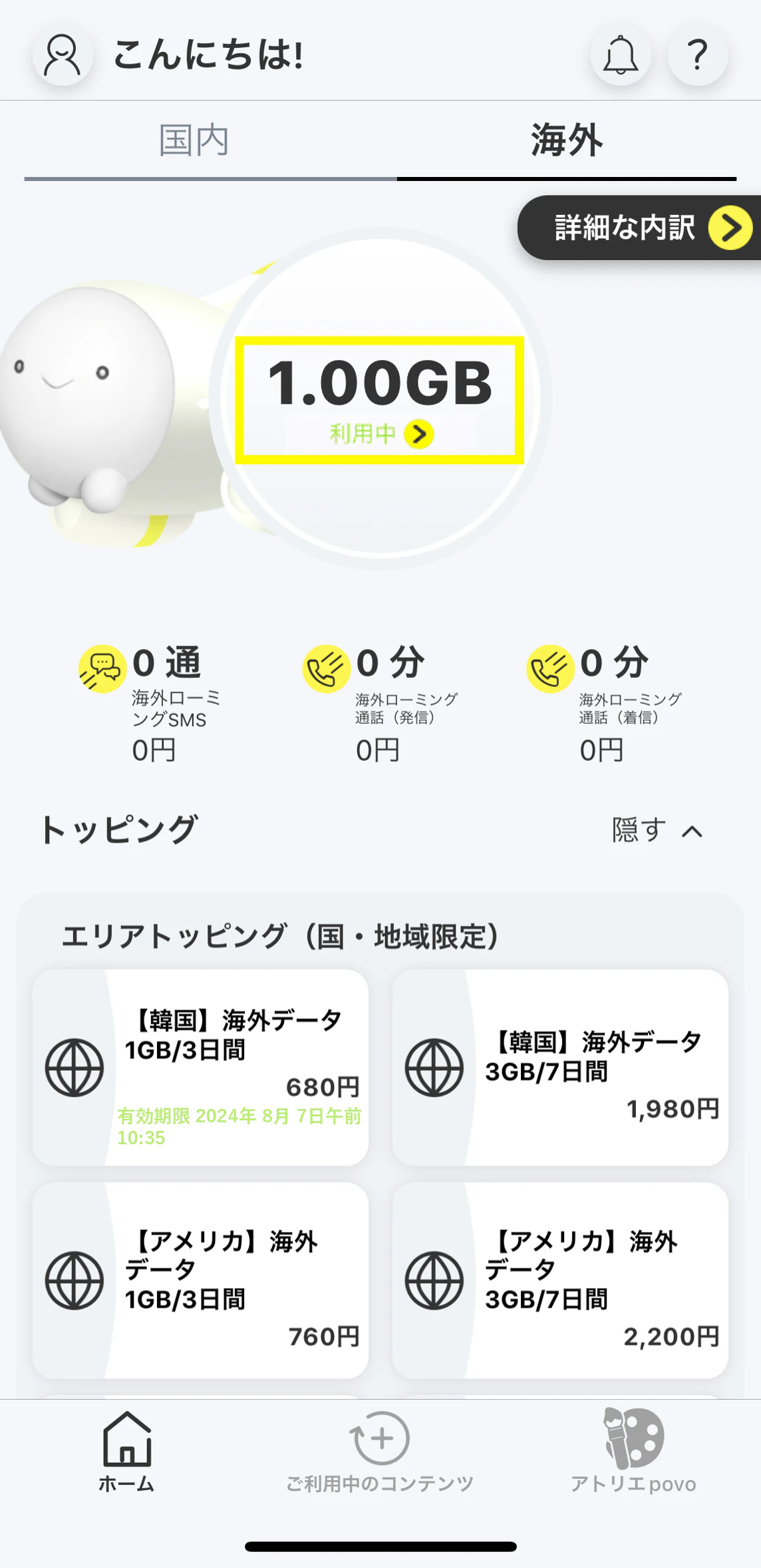
    Your data validity will begin with your data connection in the area where it is available.
    *Roaming settings on your device must be turned on (see here for instructions).

*If you do not want to use povo2.0 communications overseas, please set your device to "Airplane Mode" in the settings. After that, you can turn on Wi-Fi to communicate only via Wi-Fi. *If you would like to turn off povo 's international roaming settings, please contact povo support.

What to do after arriving

  • Click here for instructions on how to make voice calls and send SMS (messages) overseas.
  • You can check your data purchase and usage status from the home screen of povo app "Overseas."

Frequently asked questions about international roaming

Q.If I want to use data communication overseas, do I need to purchase data Toppings for overseas use?
A.

When using data communication with povo2.0 international roaming, you will need to purchase Overseas data Topping that can be used in the country or region you are traveling to. Data Topping and data bonuses for use within Japan cannot be used.

*Please note that unlike in Japan, if you do not have an Overseas data Topping, you will not be able to use low-speed communication up to 128kbps.

Please check the country, region and validity of your trip in advance and purchase the applicable Overseas data Topping.

If you have already logged in to the povo2.0 app before traveling, you can purchase Topping even if you do not have an internet connection. Select "Overseas" on the home screen of the povo2.0 app to make a purchase. If you have not logged in to the povo2.0 app, please use Wi-Fi or other means to receive the authentication code required to log in, and then log in.

Overseas data Topping available at your destinationYou can check by searching further.

Q.Can I purchase Overseas data Topping in advance before traveling abroad?
A.

Yes, you can purchase tickets in advance.

If you purchase the Overseas data Topping outside of the available area, such as Japan, the remaining data column will show "Before use begins" and the service will be in standby mode for up to 30 days. Once you connect to data communication in the available area (destination), the remaining data column will show "In use" and Topping service will begin.
No data will be consumed before you start using the service.

Therefore, we recommend that you purchase your ticket in advance in Japan before traveling.

Q.I have arrived at my destination but I can't connect to the internet.
A.

Please try turning the power on and off. Also, please check your international roaming settings. International roaming settings can be found here

If you have not used povo2.0 communications in Japan, the SIM may not have been set up on your device, so please check the setting status.

<For customers using SIM cards>

<For customers using eSIM>

If the above does not improve the situation, please try manually selecting your carrier. Devices that can use povo2.0 international roaming will automatically connect to an overseas carrier, but if automatic connection is not possible due to local communication conditions, you can manually select your carrier.
Click here for information on devices that can use povo2.0 international roaming

Please see the following page for instructions on how to manually select your carrier.
au

*Depending on the communication conditions at your destination, partner carriers and service areas may change or you may not be able to use the service. *Even within available cities and areas, you may not be able to use the service due to topographical or location conditions. *Depending on your model, you may not be able to use the service overseas. Also, the countries, regions, and communication services available vary depending on the model.

You can check the availability and fees for each country/region where international roaming is available.

*Please check the service overview for usage procedures, service contents, and important notes.

To search for your destination country or region, please check the Japanese page.

Select an area

Select a country/region

データ通信
データ
トッピング
種別
レギュラー
トッピング
エリア
トッピング
ワイド
トッピング
音声通話・SMS
音声通話
(1分あたり)
発信(滞在国内)
発信
(日本あて)
発信
(日本以外あて)
着信
SMS
(1通あたり)
※全角70文字までの料金です。134文字までは2通分、それ以降は67文字ごとに1通分の料金がかかります。
送信 円/通
受信
*[USA] Overseas data 1GB (3 days) and [USA] Overseas data 3GB (7 days) can be used in Hawaii, Alaska, Puerto Rico, and the US Virgin Islands. Please note that they cannot be used in Guam or Saipan.
*[9 European Countries] 1GB Overseas data (3 Days) and [9 European Countries] 3GB Overseas data (7 Days) are also available in Liechtenstein, San Marino, Vatican City, Canary Islands, Spanish North Africa, Guernsey, Isle of Man, and Jersey. Please note that they are not available in French Guiana or the British Virgin Islands.